Using the Service Operation Permissions Page
Use the Service Operation Permissions page (IB_HOME_PAGE10) to set permissions for individual service operations.
To access the page, select
This example illustrates the fields and controls on the Service Operation Permissions page. You can find definitions for the fields and controls later on this page.
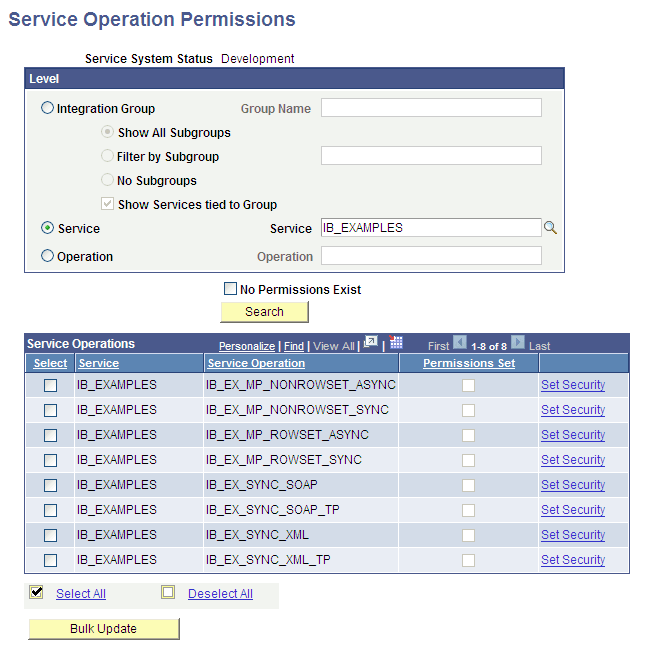
Use the options in the Level section to search for service operations for which to set permissions. The results of your search appear in the Service Operations grid at the bottom of the page.
The following fields and controls appear on the page:
| Field or Control | Description |
|---|---|
|
Service System Status |
This field displays the service system status set on the database. |
|
Integration Group |
Select the radio button to search for service operations by integration group. Use one of the following integration group filters:
|
|
Group Name |
If searching by integration group, enter the integration group name to search, or click the Lookup button to search for one. |
|
Service |
Select the radio button to search for service operations by service. When you select this option a Lookup button appears next to the Service field. Click the Lookup button to search for a service to introspect and deploy or enter the name directly in the field. |
|
Operation |
Select the radio button to search for service operations by service operation. When you select this option a Lookup button appears next to the Operation field. Click the Lookup button to search for a service operation to introspect and deploy or enter the name directly in the field. |
|
No Permissions Exist |
Check the box to filter your search results for only those service operations for which no permissions exist. |
|
Search |
Click the button to search the database for service operations based on the search criteria entered. |
|
Service Operations (grid) |
This grid displays the search results and contains the following fields and controls:
|
|
Select |
Select the box to include a service operation for bulk changes. |
|
Select All |
Select the box to select all service operations for bulk changes to service operation permissions. |
|
Deselect All |
Select the box to deselect any service operations selected. |
|
Bulk Update |
Click the button to apply permissions in bulk to selected service operations. |