Viewing Network Asynchronous Transaction Instances
Use the Tracker Overview page (IB_INTNET_TRACKOVR) to view instance information for asynchronous transactions between the local node and remote nodes in the integration network.
Before using the Tracker Overview it’s a good idea to review the Prerequisites for Using the Transactional Tracker.
The page enables you to view transaction instance counts for sending and receiving nodes at each queue level in the system. You can view this information by service operation or queue, and the direction of the transaction (inbound or outbound).
When you access the Transactional Tracker component, the Tracker Overview page appears by default.
To access the Tracker Overview page, select and in the WorkCenter navigation pane, click Transactional Tracker.
This example illustrates the fields and controls on the Transactional Tracker – Tracker Overview page. You can find definitions for the fields and controls later on this page.
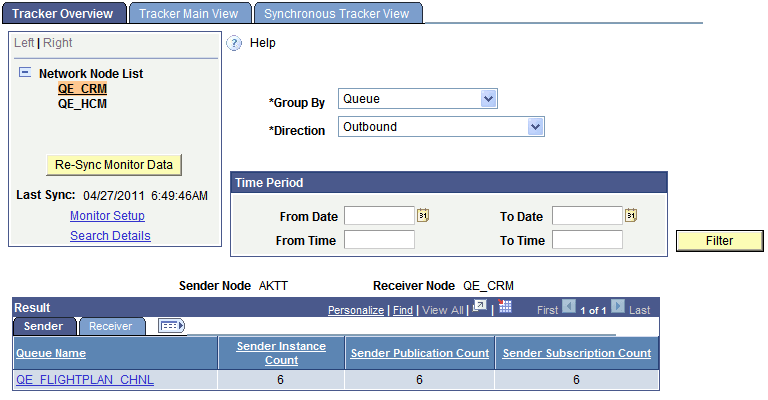
Use the Network Node List to select the remote node for which to track transactions. The system fetches available transaction data between the local node and the remote node. The system automatically synchronizes the data that appears on the page when you initially access the page and when you change the remote node.
Use one or more of the following data filters on this page:
| Field or Control | Description |
|---|---|
|
Group By |
Displays transactions based on the option selected. The valid options are:
|
|
Direction |
Indicates the direction of the transaction. The valid values are:
|
|
Time Period |
Use the options in the Time Period group box to limit the query results to transactions that occurred during a specific date range or that occurred between a specific date and time range. The Time Period group box features four fields for searching by date and time: From Date, To Date, From Time and To Time. If you complete just the date fields, the time fields automatically populate from 12:01 a.m. to 11:59 p.m. When left blank, no date or time is used as part of the search criteria. |
The Results grid displays the transaction instance data based on the default values for the filters. You can change the values for any of the fields and click the Filter button to display data based on the different filters.
When viewing the fetched data click the Expand icon to view the columns for all returned data.
This example illustrates the Tracker Overview page with the Results grid expanded to show all data returned by the system.
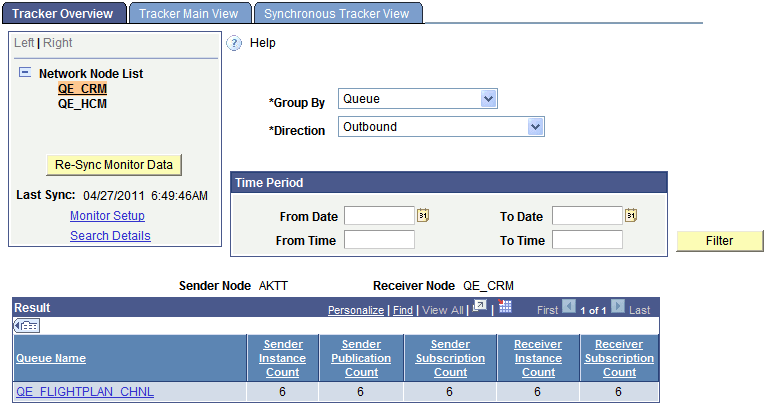
In the Results grid, click the Sender or Receiver tab to view counts of message instances, publication contracts, and subscription contracts processed by each respective node.
The following information appears in the Results grid on the Sender tab:
| Field or Control | Description |
|---|---|
|
Queue Name |
Appears when the Group By filter is set to Queue. The name of the queue that contains the name of the instances shown. Click a queue name link to launch the Tracker Main View page to view details of the transactions associated with the queue. |
|
Service Operation |
Appears when the Group By filter is set to Service Operation. The name of the service operation that contains the instances shown. Click a service operation name link launch the Tracker Main View page to view details of the transactions associated with the service operation. |
|
Sender Instance Count |
Shows the number of message instances the sender has sent to the receiving node. |
The following information appears in the Results grid on the Receiver tab:
| Field or Control | Description |
|---|---|
|
Sender Publication Count |
Shows the number of publication contracts the sender has sent to the receiving node. |
|
Sender Subscription Count |
Shows the number of subscription contracts the sender has sent to the receiving node. |
|
Receiver Instance Count |
Shows the number of message instances received by the receiving node. When viewing the Sender tab you may have to click the Expand icon on the Results grid to view this field. |
|
Receiver Subscription Count |
Shows the number of subscription contracts received by the receiving node. |