Adding and Modifying XSL Map Code
If you add code to XSLT that you create using Oracle XSL Mapper that contains any PeopleSoft-related elements it will not compile successfully, unless you create a configuration file of PeopleSoft elements that the mapper should ignore. After you create this file specify the file location and name in the Oracle XSL Mapper Preferences.
Creating Elements to Ignore Configuration Files
For example, you could add code that contains the following elements:
<element name = "psft_function">
<element name = "psft_workingstorage">
You would create a file using the following format, which tells Oracle XSL Mapper to ignore those elements:
<?XML version='1.0' encoding='windows-1252'?>
<elements-to-ignore>
     <element name = "psft_function"/>
     <element name = "psft_workingstorage"/>
</elements-to-ignore>
Specifying Elements to Ignore Configuration Files in Oracle XSL Mapper Preferences
Once you create the file of PeopleSoft elements to ignore, enter the file location and name in the mapper Preferences dialog box.
This example illustrates the Preferences dialog box in the Oracle XSL Mapper.
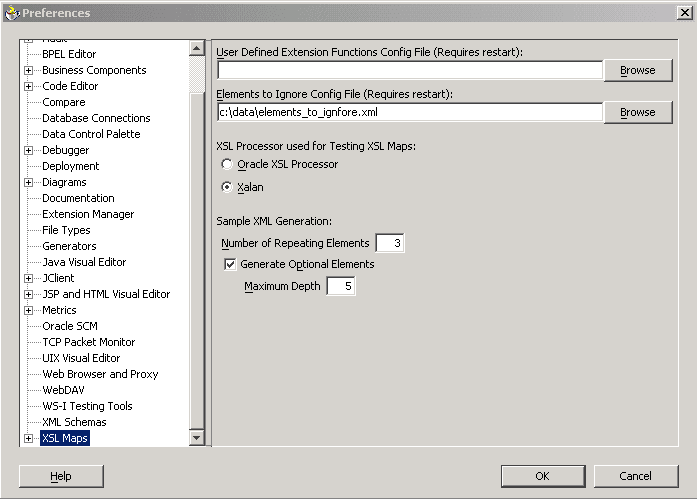
To specify an elements to ignore configuration file in Oracle XSL Mapper preferences:
-
In Oracle XSL Mapper, from the Tools menu, select Preferences.
The Preferences dialog appears.
-
In the list on the left-side of the window, click XSL Maps.
-
In the Elements to Ignore Conf. File (Requires Restart) field, enter or browse to the location of the elements to ignore configuration file that you created.
-
Click the OK button.
You must restart Oracle JDeveloper for the system to recognize the configuration file.