Copying Webhook Metadata into Application Designer Project
You can copy Webhook metadata into an Application Designer project.
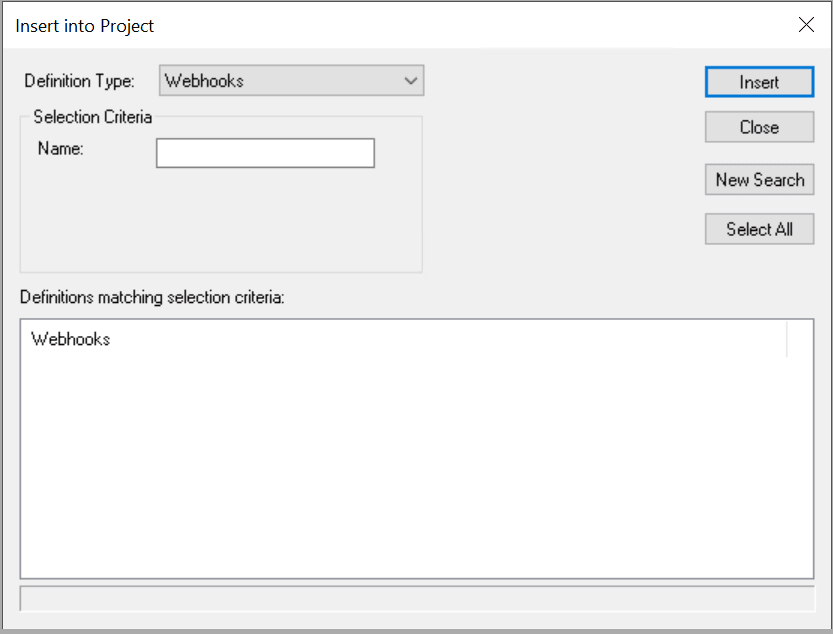
To copy all metadata for the Webhook into an Application Designer project, from the Application Designer menu, select . Select Webhooks as the Definition Type on the Insert into Project pop up window.
The Compare and Upgrade copy goes through the standard process for managed objects.
Note:
If a Request and/or Response Document is defined for the Webhook, then the Document(s) will be copied and included in the project.This example illustrates the fields and controls for the Webhooks Definition Type in the Insert into Project pop up window in Application Designer. You can find definitions for the fields and controls later on this page.
| Field or Control | Description |
|---|---|
|
Definition Type |
Select Webhook to search for webhook definitions and insert them into the current project. |
|
Name |
Enter the full or partial webhook definition name to filter the search results. |
|
Definitions matching selection criteria |
Lists the matching webhook definitions returned by the search. Select one or more webhook definitions to insert into the project. |
|
Insert |
Inserts the selected webhook definitions into the current project. |
|
Close |
Closes the Insert into Project pop up window. |
|
New Search |
Clears the current search results so you can enter new selection criteria and run another search. |
|
Select All |
Selects all webhook definitions listed in the search results. |