Defining Codeset Groups
Use the Codeset Groups page (IB_CODESETGRPVAL) in the Codeset Groups component (IB_CODESETGROUP) to define codeset groups. To access the Codeset Groups page, select .
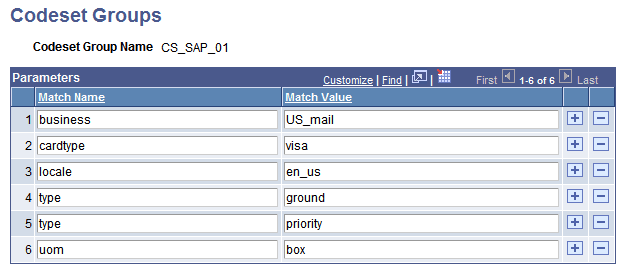
This example illustrates the Codeset Groups page.
To define a codeset group:
-
Add a new value, enter a codeset group name, and click Add.
Enter a name that reflects a common quality of the nodes you plan to assign to this group; for example, the name of the software they all use to manage shipping.
The Codeset Group page appears.
-
Add a new row.
-
Enter a match name.
This is the name of a data field that might be part of a message sent by a node belonging to this codeset group. You don’t have to create an entry for every field, just the ones that you’ll need to translate or use for reference in a translation.
-
Enter a match value.
This is one of the possible values of the data field represented by the match name.
-
Repeat steps 2 through 4 for each significant name/value pair that you expect to appear in a message.
This doesn’t need to be all possible values of all of the message fields, just the names and values you expect to require translation.
-
Assign one or more nodes to this codeset group.
Every initial and result node involved in a data translation must belong to a codeset group. You must assign each participating node to an appropriate codeset group by an entry in its node properties.
Note:
The assignment for each node is required only in the database of the node performing the data translation. This translating node needn’t be either the source or the target. Multiple nodes that represent data the same way may be assigned to the same codeset group.
Related Topics