Defining Codeset Values
Use the Codeset Values page (IB_CODESETVAL) in the Codeset Values component (IB_CODESETVAL). Select to access the Codeset Values page.
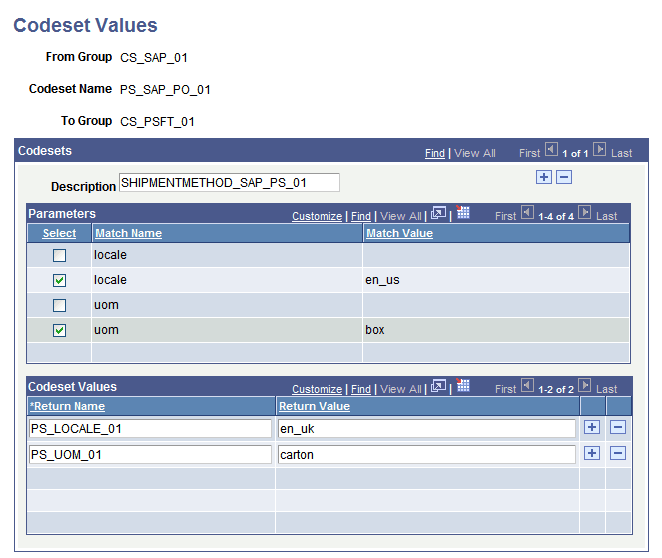
This example illustrates the Codeset Values page.
To define codeset values:
-
Add a new value and select a codeset group name for the From group.
This is the codeset group to which the initial node belongs.
-
Select a codeset name from the codesets based on the group you selected.
This is the codeset whose match name/match value permutations you wish to match.
-
Select a codeset group name for the To group.
This is the codeset group to which the result node belongs.
-
Click Add.
The Codeset Values page appears. The upper grid contains the selected codeset’s match name/match value pairs, and the lower grid contains the return values you specify. Each permutation that you define has its own Description field, which can help you distinguish between permutations that may be subtly different from each other.
Note:
To configure an existing codeset values definition, enter its From group, codeset name and To group on the search page.
-
Select check boxes to define a permutation of match name/match value pairs.
For each match name, you can select at most one match value.
A permutation consisting of all blank values serves as a wild card; it matches any input value combination that isn’t matched by any other permutation. However, a permutation with some blank and some non-blank values works differently; it requires the names with blank values to actually match blank field values in the input data.
Note:
You’ll generally define only permutations that you expect the input data to contain, but make sure you allow for unforeseen match values by including permutations with all blank values. You can then specify default return values for those permutations. With a large number of match names in the codeset, you can make sure to catch all unforeseen combinations by defining a permutation with all blank match values.
-
In the Code Set Values grid, enter a return name, and a return value for that name.
You can use any return name you want, because only your codeset translation program refers to it. Your translation program can use the return value as a field value or as a node name in the output data.
Important:
The set of return names you define must be identical for all of the permutations of match name/match value pairs for the current codeset in this definition. Your translation program invokes the codeset and applies the return names from this definition, but it can’t anticipate which permutations will be matched, or which actual return values it’s applying — just the return names.
-
(Optional.) In the Code Set Values grid, add a new row and repeat step 6.
Add as many return name/return value pairs as you need for your output based on the current permutation. If the permutation is matched in the input data, the code set values you define for that permutation become available for you to call and insert in the output data.
-
(Optional.) At the top level of this page, add a new row and repeat steps 5 through 7.
This inserts a new permutation row, in which you can define a different permutation of match name/match value pairs that you expect for the current codeset. For each permutation, you’ll define a separate, independent set of codeset values.