Deleting Nonrowset-Based Message Schemas
You can delete individual nonrowset messages or delete schemas in bulk.
Deleting Individual Nonrowset-Based Message Schemas
Use the Messages-Schema page (IB_MESSAGE_BUILD2) to delete individual nonrowset-based XML message schema.
To delete an individual nonrowset-based message schema:
-
Select
-
Click the Schema tab.
-
Click the Delete Schema button.
Deleting Nonrowset-Based XML Message Schemas in Bulk
To delete one or more nonrowset-based XML message schemas, use the Message Schemas page (IB_HOME_PAGE6) in the Service Administration component (IB_HOME_PAGE).
This example illustrates the Service Administration – Message Schemas page.
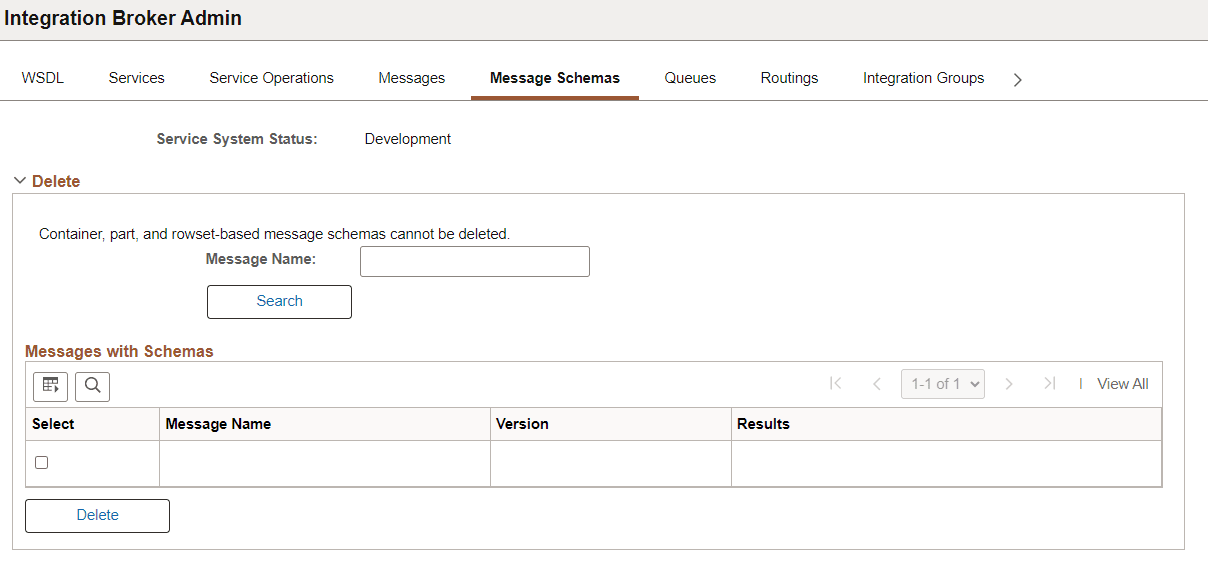
To delete nonrowset-based XML message schemas in bulk:
-
Select
-
Click the Message Schemas tab.
-
Choose the schema or schemas to delete.
To delete an individual schema, in the Message Name field enter the name of the message that contains the schema to delete.
To delete more than one schema, click the Search button to display all nonrowset-based message in the system than contain schema.
The message or messages appear in the Messages with Schema grid.
-
In the Select column, select the check box next to each message name that contain schema you want to delete.
If deleting multiple schemas, use the forward and backward arrows and/or the Last and First links to page through the results and select schemas to delete.
-
Click the Delete button.