Exporting Chatbots
In order for Oracle Digital Assistant (ODA) to make call backs into PeopleSoft, the skill must be created in ODA.
The Export Chatbot page is used to generate custom components for ODA usage from the Application Service metadata.
Refer to Chatbot specific documentation on how to build Chatbot integrations in ODA.
Select .
This example illustrates the fields and controls on the Export Chatbot page. You can find definitions for the fields and controls later on this page.
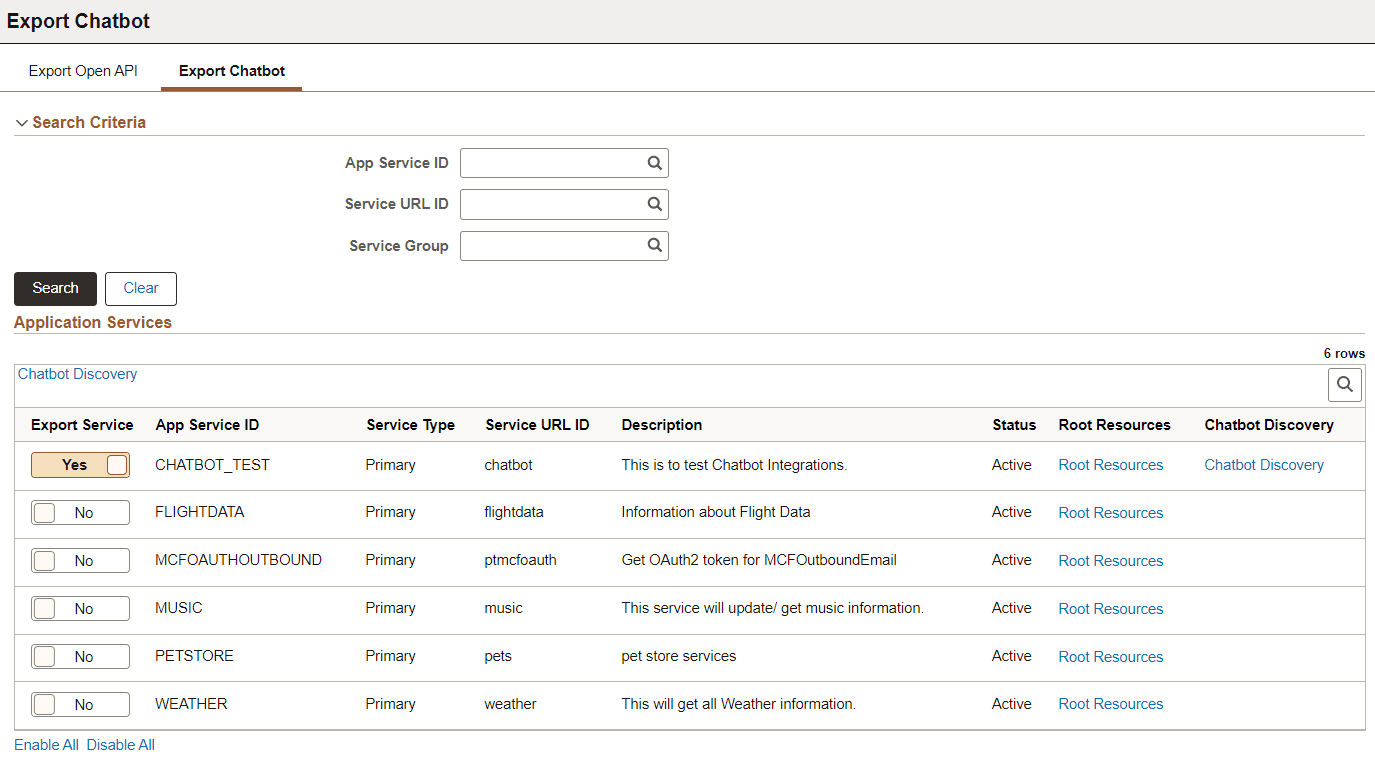
Search for Application Services based on Application Service ID, Service URL ID, and Server Group.
Search Results will return:
-
Active Primary Application Service meeting the selection criteria.
-
Alias Application Service if the primary is inactive and the Alias is active.
| Field or Control | Description |
|---|---|
|
Chatbot Discovery |
The Chatbot Discovery link at the top of the Export Services grid will show all export enabled Application Services and their associated component names. |
|
Export Service |
Select Yes to export a service. |
|
Root Resources |
Select this link to open the Root Resources page for the Application Service. |
|
Chatbot Discovery |
The Chatbot Discovery link on Export Services grid will show the Application Service and its associated component names. |
The results of the search will show Application Services with their export status (Export Service toggled to Yes). The administrator can select one or more Application Service to generate a Discovery Chatbot document. There is no Save on this page as the Discovery Chatbot documentation will be generated based on selection.
Criteria for Generation of Discovery Chatbot Documentation
Select the Root Resources link on the Export Chatbot page to open the Root Resources page for the Application Service. The Root Resource page will show the Root Resources expanded to display all URI Indexes and their associated Methods. This page will also include both Primary and Alias Resources based on Active Status.
This example illustrates the fields and controls on the Root Resources page to define the Component for ODA
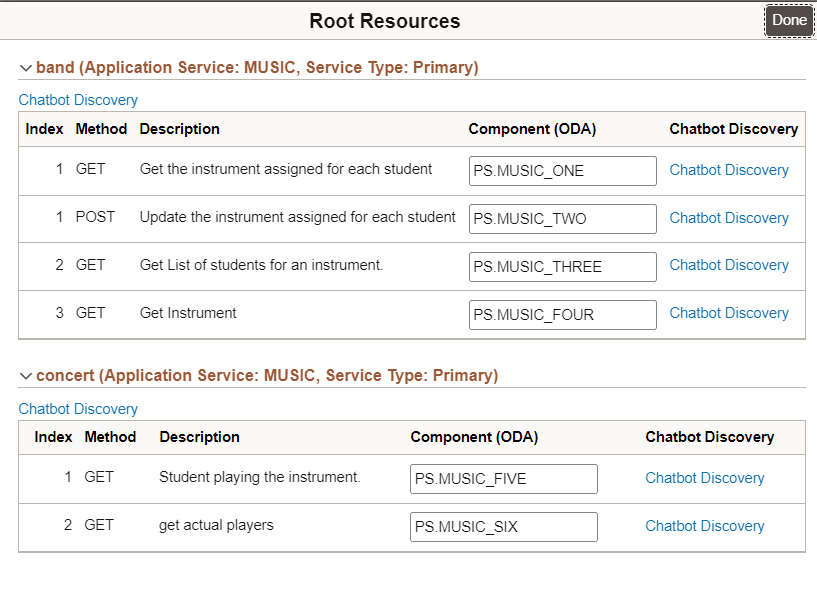
A unique Component (ODA) name for must be entered for each Index/method to be included in the Chatbot Discovery. This component name is used on the People Soft Component to define the Chatbot Integration.
| Field or Control | Description |
|---|---|
|
Chatbot Delivery |
The Chatbot Discovery link for the Route Resource show the all the Root's associated Component names. |
|
Component (ODA) |
Component (ODA) naming criteria.
|
|
Chatbot Discovery |
If a component name is entered, this link for the component will show the component name information.. |