Importing Root Resource
Use the Import Root Resource button to import a root resource from another Application Service or the same Application Service.
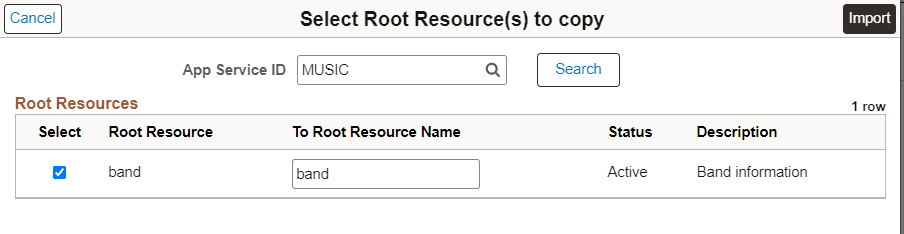
This example illustrates the fields and controls on the Select Root Resource(s) to copy page. You can find definitions for the fields and controls later on this page.
| Field or Control | Description |
|---|---|
|
App Service ID |
Select the Application Service by either entering the Application Service ID directly or using the Search Button. |
|
Search |
Selection of the desired App Service ID will display all the Root Resources for that Application Service. |
|
Select |
Select for the root resource you want to import. |
|
Root Resource |
Root resource. |
|
To Root Resource Name |
Optionally, you can change the name for the root resource. |
|
Status |
Root resource status. |
|
Description |
Description. |
|
Import Button |
Select the import button to copy all the metadata except for the Application Class information from the Root Resource over to the Application Service. All template parameters defined for the root resource are copied to the Base Template page. The root resource is displayed in the Root Resources section of the Application Service. The Application Class information for the imported root resource will be blank. |