Outbound Request Flow
The following diagram shows an outgoing request through PeopleSoft Integration Broker.
This example illustrates and outbound request through PeopleSoft Integration Broker to an external system.
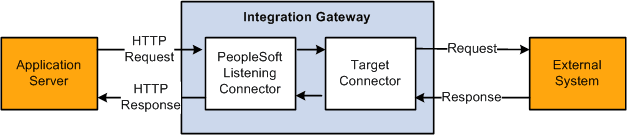
There are several scenarios that might result in a request being sent out of the broker. Requests can be sent in PeopleCode by using the Publish or SyncRequest methods of the Integration Broker class.
Regardless of how the request is created, the mechanism for sending it out of the broker is the same, and the flow is the same regardless of the specific outgoing target connector you invoke.
Step 1: Application Server Generates Request
Once an outgoing request has been generated, the application server must perform some basic processing before it can be sent out.
The application server looks at the request, and extracts the information about the node that it is being sent to.
If target connector information was not supplied via PeopleCode or as part of the routing, then the node name is then used to look up the name of the gateway to use, the target connector to use on that gateway, as well as any specific connector properties that need to be passed to the connector in order to handle the request. If this information is not found, an error will occur.
The application server modifies the outgoing request with the appropriate connector information.
The request is then converted to the MIME standard format, and is sent to the gateway over an HTTP connection.
The request must be sent to the PeopleSoft listening connector on the gateway. The application server uses the value of the Gateway URL defined for the given gateway. If this URL is not valid or does not point to the PeopleSoft listening connector, the application server will be unable to send the request.
Step 2: Request is Received by the PeopleSoft Listening Connector
When the MIME request is received by the PeopleSoft listening connector, it is written to the gateway log file.
The request is converted from MIME format to a gateway request object.
The connector then examines the request to determine what target connector the request is to be sent to; that target connector is then invoked.
Step 3: Request is Received by the Target Connector
The target connector validates the request. Each connector requires certain properties to be set, otherwise the request cannot be sent. For example, the HTTP target connector requires that the Primary URL be set. If any mandatory connector properties are missing or are invalid, an error will be thrown.
The target connector then converts the request into whatever format is required by the protocol.
The modified request is then written to the gateway log, and then sent out.
Step 4: Response is Received by the Target Connector
The response received by the target connector is written to the gateway log, and the response is used to build a gateway response object, which is then returned to the PeopleSoft listening connector.
Step 5: Response is Received by the PeopleSoft Listening Connector
The response object is then converted to the MIME standard format by the connector.
The MIME response is then written to the gateway log file, and is then returned to the application server.
Interactions with the gateway are always synchronous. If a request is sent to the gateway, a response should be expected.
Step 2 is an HTTP POST request made of the gateway, and the response created here in Step 5 is returned in response to that HTTP request. The HTTP connection is open for the duration of the processing for that request.
The response object is returned to the listening connector, upon which the response is mapped to a response suitable for the given protocol.