Step 1: Select WSDL Source
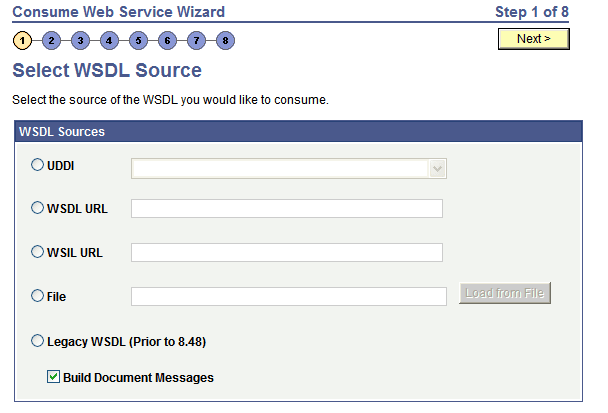
Use the Select WSDL Source page (IB_WSDL_IMP_LOC) to select the source for consuming a WSDL document.
This example illustrates the Select WSDL Source page.
To select the WSDL source:
-
Access the Select WSDL Source page ().
-
Select the radio button next to one of the following values and enter the information specified:
Field or Control Description UDDI
To consume a WSDL document from a UDDI repository, select theUDDI radio button.
After you select the radio button, select the UDDI repository from the drop-down list box.
To use this option, you must first specify the UDDI repository in the PeopleSoft system.
WSDL URL
To consume a WSDL document from a WSDL URL, select the WSDL URL radio button.
After you select the radio button, enter the URL in the WSDL URL field.
WSIL URL
To consume a WSDL document from a WSIL URL, select the WSIL URL radio button.
After you select the radio button, enter a URL in the WSIL URL field.
File
To consume a WSDL document from a file enter a file name in the File field or browse for the file.
To enter the file name, in the File field, enter the path and file name. For example: c:\temp\sample.wsdl
To browse for the file:
-
Click the Load from File button.
A file upload page appears.
-
Click the Browse button to search for and select the file location and name.
-
Click the Upload button.
The Select WSDL Source page appears with the file location and name populated in the File field.
The Select WSDL Source page appears with the file location and name populated in the File field.
Legacy WSDL (Prior to 8.48)
Select this option to consume a PeopleSoft WSDL document generated from releases prior to PeopleTools 8.48.
-
-
At the Build Document Messages check box:
-
Select the check box to build document type messages for the consumed service. (Default.)
-
Deselect the check box to build nonrowset-based messages for the consumed service.
-
-
Click the Next button to proceed to the next step in the wizard.