Step 5: Convert Asynchronous Operations
The Convert Asynchronous Operations page (IB_WSDL_IMP_ASYNOP) appears when the system detects that you are consuming two asynchronous one-way operations. The two asynchronous one-way operations appear in the Asynchronous One-Way Operations section on the page.
This example illustrates the Convert Asynchronous Operations page.
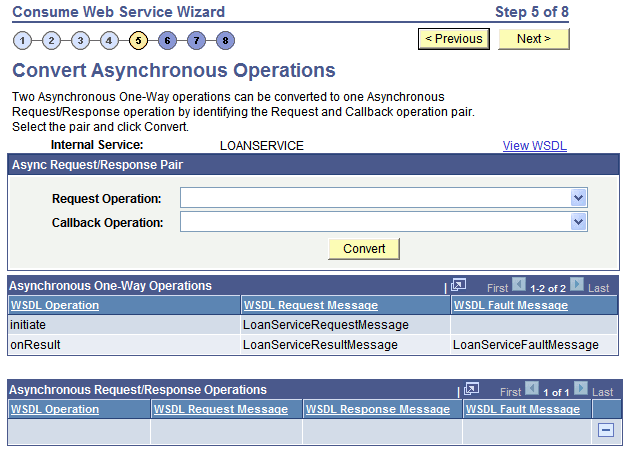
This page enables you to convert the two operations into a single asynchronous request/response operation type.
WSDL specification 1.1 has no standards for specifying an asynchronous request/response operation. Hence, the Consume Web Service wizard is not able to automatically detect such operations in a WSDL 1.1 document.
To make this conversion, you must specify the request operation and the callback operation, using the Request Operation and Callback Operation fields on the page. The system populates the possible values to select in each field from the operation selected.
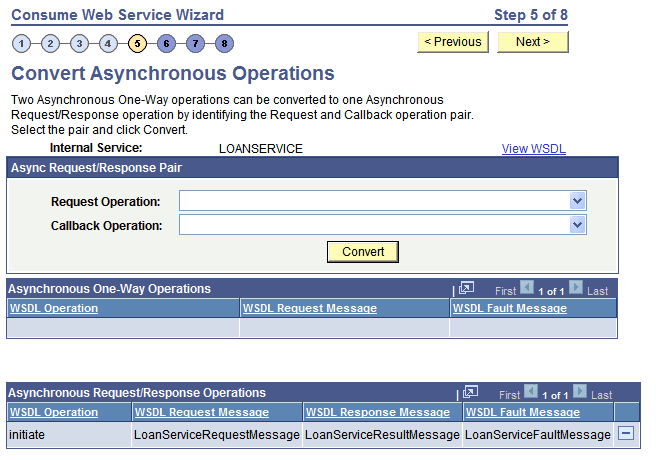
After you make the conversion the new asynchronous request/response operation appears in the Asynchronous Request/Response Operations section of the page.
This example illustrates the Convert Asynchronous Operations page. The example shows the page after converting an asynchronous one-way service operation into an asynchronous request/response service operation.
To convert two one-way asynchronous operations into one asynchronous request/response operation:
-
From the Request Operation drop-down list box, select the request operation.
-
From the Callback Operation drop-down list box, select the callback operation.
-
Click the Convert button.
The single operation appears in the Asynchronous Request/Response Operations grid at the bottom of the page.
To undo a conversion, in the Asynchronous Request/Response grid click the Delete a Row button (-) at the end of a data row.