Supplying JSON Schema
For the Parameter Data Types of Compound, Compound Array or Custom the developer must supply a JSON schema to indicate the complex shape of the object.
Note:
The schema when defined on the OpenAPI is not a complete schema as the schema is part of other schemas declared to construct the Open API. Therefore when the schema is pulled out to generate the OpenAPI it looks for the first "type" and takes everything from within there. So one could simply store a schema with the type but still must include the beginning brace { and ending brace } so that it still a valid schema. Note also that for Custom and Compound the first "type" must be defined as an "object". For a Compound Array the "type" must be "array".
Example Schemas for Compound or Custom
This example schema is part of the other schemas to define the overall shape as generated via Open API.
{
	"type": "object",
	"properties": {
		"Contact_name": {
			"type": "string",
			"maxLength": 60
		},
		"Contact_Title": {
			"type": "string",
			"maxLength": 30
		},
		"Contact_Phone": {
			"type": "string",
			"maxLength": 30
		}
	}
}
Here is another example.
{
"$schema": "http://json-schema.org/draft-06/schema#",
"title": "Contracts",
"type": "object",
"properties": {
"Contact_name": {
"type": "string", "maxLength": 60},
"Contact_Title": {
"type": "string", "maxLength": 30},
"Contact_Phone": {
"type": "string", "maxLength": 30}}
}
Example Schema for Compound Array
This example schema is part of the other schemas to define the overall shape as generated via Open API.
{
	"type": "array",
	"items": {
		"properties": {
			"Contact_name": {
				"type": "string"
			},
			"Contact_Title": {
				"type": "string"
			},
			"Contact_phone": {
				"type": "string"
			}
		}
	}
Schema's constructed from the JSON Specification Definition must also adhere to the OpenAPI definition for Schema's. Here is an excerpt from the OpenAPI definition with respect to JSON Schema's:
The following properties are taken from the JSON Schema definition but their definitions were adjusted to the OpenAPI Specification.
| Property | Definition for OpenAPI Specification |
|---|---|
|
type |
Value MUST be a string. Multiple types via an array are not supported. |
|
allOf |
Inline or referenced schema MUST be of a Schema Object and not a standard JSON Schema. |
|
oneOf |
Inline or referenced schema MUST be of a Schema Object and not a standard JSON Schema. |
|
anyOf |
Inline or referenced schema MUST be of a Schema Object and not a standard JSON Schema. |
|
not |
Inline or referenced schema MUST be of a Schema Object and not a standard JSON Schema. |
|
items |
Value MUST be an object and not an array. Inline or referenced schema MUST be of a Schema Object and not a standard JSON Schema. Items MUST be present if the type is array. |
|
properties |
Property definitions MUST be a Schema Object and not a standard JSON Schema (inline or referenced). |
|
additionalProperties |
Value can be boolean or object. Inline or referenced schema MUST be of a Schema Object and not a standard JSON Schema. Consistent with JSON Schema, additionalProperties defaults to true. |
|
description |
CommonMark syntax MAY be used for rich text representation. |
|
format |
See Data Type Formats for further details. While relying on JSON Schema's defined formats, the OAS offers a few additional predefined formats. |
|
default |
The default value represents what would be assumed by the consumer of the input as the value of the schema if one is not provided. Unlike JSON Schema, the value MUST conform to the defined type for the Schema Object defined at the same level. For example, if type is string, then default can be "foo" but cannot be 1. |
Workaround for Chatbot Specific Integrations
Boolean and Document parameter types not supported for Chatbot specific integrations. To work around this limitation
-
Boolean
Use the String parameter type and define the following enums (true, false).
-
Documents
-
Use a Document to define the shape of the data and generate a JSON schema.
-
Create a Custom parameter type.
-
Export the JSON schema from the Document to add as the Custom JSON schema.
The following PeopleCode snippets shows how convert to/from a Document for a JSON Object that is defined as an Input/Output Parameter Type of Custom.
Example PeopleCode to convert Document to JSON Object:
&Doc = CreateDocument("Demo", "flightData", "v1");
&COM = &Doc.DocumentElement;
&COM.GetPropertyByName("RadarSelection").value = 2;
&COM.GetPropertyByName("RadarMode").value = "TWS";
&COM.GetPropertyByName("BarScan").value = "4B 40";
&COM.GetPropertyByName("PRF").value = "HIGHT";
&COM.GetPropertyByName("ChannelSet").value = "2A";
&COM.GetPropertyByName("RadarRange").value = "40";
&COM.GetPropertyByName("Azimuth").value = "75";

Local JsonParser &jsonParser = CreateJsonParser();
&parseStatus = &jsonParser.Parse(&Doc.GenJsonString());

Local JsonObject &jObj = &jsonParser.GetRootObject();
%This.ServiceAPI.OutputRows [1].setParameter("flightData", &jObj);
Example PeopleCode to convert JSON Object to Document:
&jObj = %This.ServiceAPI.InputRows [1].getParameter("base"); &Doc = CreateDocument("Demo", "base", "v1"); &ret = &Doc.ParseJsonString(&jObj.ToString()); -
Adding Enumerated Values
Enumerated Values can be added to parameter type String or String List. To add enumerated values:
-
Create the String or String List and select Done.
-
Open the parameter, it will contain a link to Add Enumerated Values.
-
Select the Add Enumerated Values link.
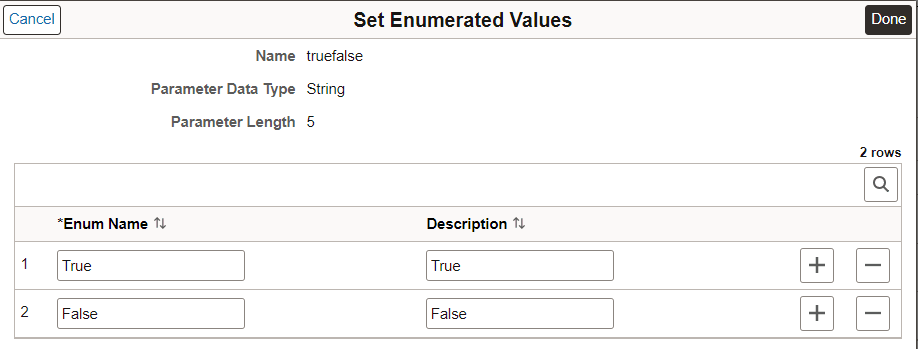
This example illustrates the fields and controls on the Set Enumerated Values page.
-
Enter the values and click Done.