Synchronous Service Operation Publication
This topic discusses synchronous service operation publication in PeopleSoft Integration Broker.
This example illustrates using PeopleSoft Integration Broker to consume a synchronous service operation.
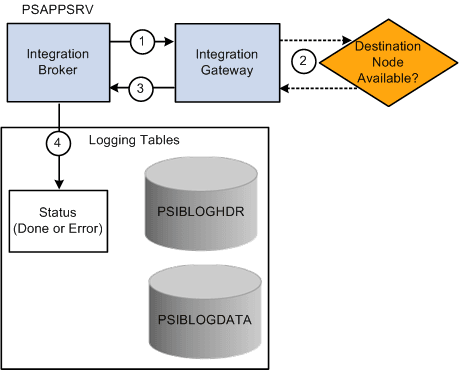
The following table describes the processing steps for a synchronous publication of a service operation in PeopleSoft Integration Broker:
| Step | Process |
|---|---|
|
1 |
The integration engine sends the service operation to the integration gateway. |
|
2 |
The integration gateway attempts to deliver the service operation to the destination node. |
|
3 |
The integration gateway sends back the status information to the integration engine |
|
4 |
The integration engine updates the database tables as well as sends the status information to the Service Operations Monitor. The possible statuses in the Service Operations Monitor for a synchronous publication are:
|
You can view the status information for the invocation in the Service Operations Monitor using the Synchronous Services page. To access the page select
For status information for synchronous integrations to be available in the Service Operations Monitor, you must set the Log Detail parameter in the routing definition for the service operation.
Related Topics
- Defining General Routing Information
- Integration Broker Service Operations Monitor: Understanding Synchronous Service Operation Statuses
- Integration Broker Service Operations Monitor: Filtering Synchronous Service Operations Data
- Integration Broker Service Operations Monitor: Viewing Monitor Output for Synchronous Service Operations Data