Using the Get Routing Information Page
Use the Get Routing Information page (IB_INTDEPLOY_SEC) to view the existing routing definition for a service operation and to add the data to the deployment configuration table.
To access the page, on the Deployment Configuration grid page, click the Get Routing Information link.
This example illustrates the fields and controls on the Get Routing Information page. You can find definitions for the fields and controls later on this page.
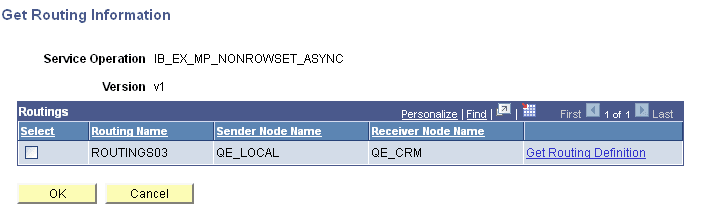
The following fields and controls appear on the page:
| Field or Control | Description |
|---|---|
|
Service Operation |
Service operation name. |
|
Version |
Service operation version. |
|
Select |
Select the box to populate the routing deployment table with the routing definition in the database. |
|
Routing Name |
Routing name. |
|
Sender Node Name |
Name of the sending node. |
|
Receiver Node Name |
Name of the receiving node. |
|
Get Routing Definition |
Click the link to access the Routings component to view the existing routing definition for the service operation. Click the Return button from the component to return to the Get Routing Information page. |
|
OK |
Click the button after you select the Select box to populate the routing deployment table with the routing definition in the database. |
|
Cancel |
Click the button to exit the page without populating the routing deployment database with the data from the existing routing definition. |