Viewing Routings Page
The Routings page provides a summary of routing definitions for a service operation.
Click the Routings tab to open the Service Operations - Routings page (IB_SERVICERTNGS) to view a summary of routing definitions for an operation.
This example illustrates the Routings page.
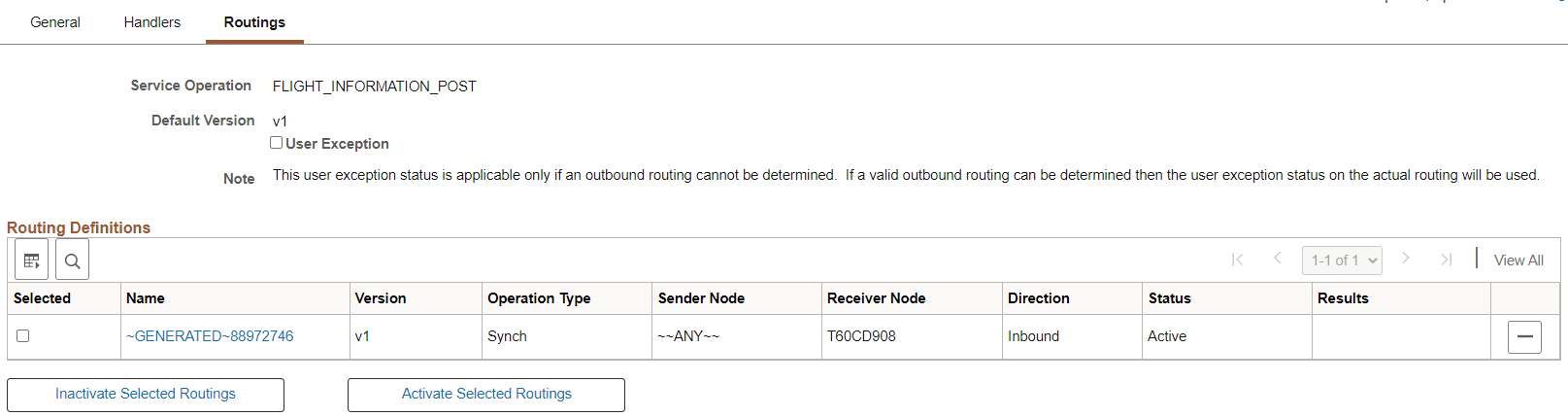
The Routings Definition grid on the page lists summary information for routings that are defined for a service operation. Summary information that is displayed includes the routing definition name, service operation version, routing type, sending node, receiving node, direction of the routing and the routing status.
Click a routing definition name to open the routing in the Routing Definitions component, where you can view additional information about the routing.
When you create a provider REST service operation the system automatically creates an any-to-local routing. You can also generate local-to-local routings for a provider REST service operation.
See Viewing Routing Definitions in Graphical Format.
You can also use this page to activate or inactivate routings for an operation.
See Adding Routing Definitions, Activating and Inactivating Routing Definitions.