Viewing Rowset-Based Message Structures
This section discusses the three ways to view the structure of rowset-based message definitions. This section discusses how to:
-
View the entire structure of rowset-based message definitions.
-
View only the records in rowset-based message definitions.
-
View only included records fields in rowset-based message definitions.
Viewing the Entire Structure of Rowset-Based Message Definitions
By default, when you open a rowset-based message definition in the Messages – Message Definition page, PeopleSoft Integration Broker displays the complete message definition structure.
This example illustrates a partial view of the Messages – Message Definition page. The bottom portion of the page, shown here, shows the complete message definition structure for the message QE_FLIGHTPLAN.
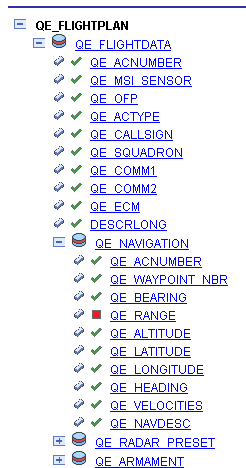
The system displays the definition in a tree structure. Use the Expand button (+) and the Collapse (-) button to expand and collapse the tree to view all records, subrecords and fields (both included and excluded) in the definition.
Record fields that are included in the message definition have a check next to them. Record fields that are not included in the message definition have a box next to them. In the previous graphic, QE_RANGE is the only record field that is not included in the QE_FLIGHTPLAN message definition.
You can view the record or field properties by clicking the record or field name.
To view the entire structure of a rowset-based message:
-
Select
-
Select a message to view.
The Messages-Message Definitions page appears and the entire structure of the message appears in a tree view.
-
Expand and collapse the tree to view the message structure.
Viewing Only the Records in Rowset-Based Message Definitions
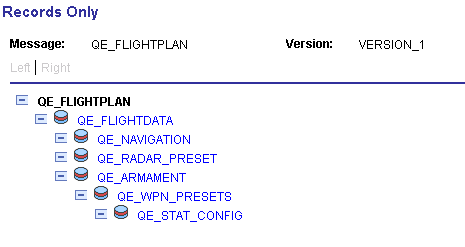
You can use the Records Only page (IB_MESSAGE_TR_SEC) to view the records and subrecords in a rowset-based message definition.
This example illustrates the Records Only page. The example shows records and subrecords for the QE_FLIGHTPLAN message displaying in the Records Only page.
To view only the records in a rowset-based message:
-
Select
-
Select a message to view.
The Messages-Message Definitions page appears.
-
Just above the tree structure view of the message structure, click the View Records Only link.
The Records Only page appears and the records and subrecords in the message definition display in a hierarchical view.
-
Click the Return button to return to the Messages-Message Definitions page.
Viewing Only Included Record Fields in Rowset-Based Message Definitions
You can use the Included Fields Only page (IB_MESSAGE_TR_SEC) to view the included records fields for a rowset-based message definition.
This example illustrates the Included Fields Only page. The example shows a sample of the records and their included fields contained in the QE_FLIGHTPLAN message definition.
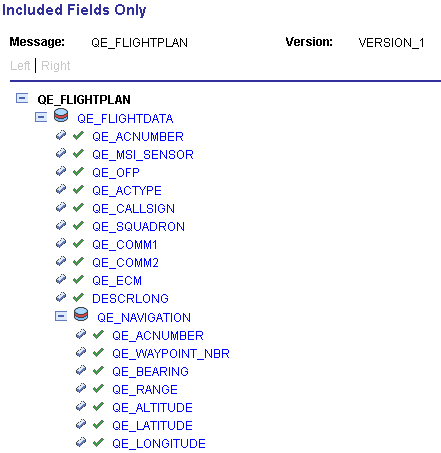
Included fields are denoted by a green icon in the shape of a check mark.
To view included record fields in a rowset-based message:
-
Select
-
Select a message to view.
The Messages–Message Definitions page appears.
-
Just above the tree structure view of the message structure, click the View Included Fields Only link.
The Included Fields Only page appears and included records fields contained in the message display.
-
Click the Return button to return to the Messages-Message Definitions page.