Inserting Root Records
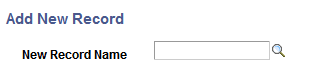
You insert a root record into a rowset-based message definition using the Add New Record page (IB_MESSAGE_TOP_SEC).
This example illustrates the Add New Record page.
Note:
There can only be one root record defined for each rowset-based message.
To insert a root record into a definition:
-
Access the Add New Record page.
Select . The Messages-Message Definitions page appears. Click the Add Record to Root link.
-
In the New Record Name field, enter the name of the record to add, or click the Lookup button to search for and select one.
-
Click the OK button.
The root record appears in the tree structure. Click the Expand button (+) to expand the tree and view fields that are associated with the record.
You can exclude fields from the record and specify field name aliases. Steps for performing these actions are described elsewhere in this topic.