Viewing Services Operations with Exported WSDL/WADL Inconsistencies
If the system detects a WSDL/WADL flag inconsistency, the following status message appears on the Messages-Message Definitions page for those message definitions referenced in the service operation for the WSDL/WADL in question:
Exported WSDL flag inconsistency detected. WSDL does not exist.This example illustrates the Messages – Message Definitions page. The example shows the “Exported WSDL flag inconsistency detected” status message and the Exported WSDL Inconsistency link appearing on the page.
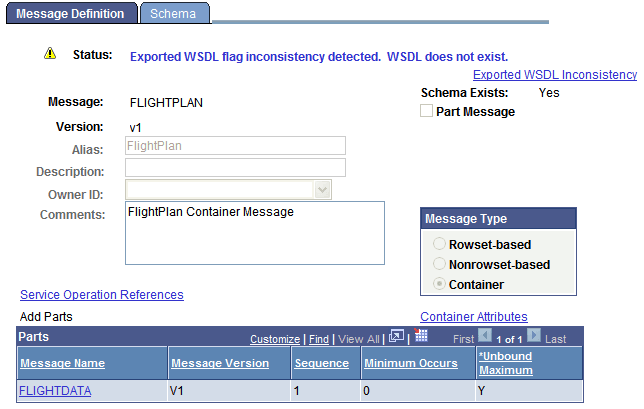
In addition, an Exported WSDL Inconsistency link appears on the Messages-Message Definitions page. Click this link to view the Exported WSDL Inconsistencies page (IB_HOME_PAGE7_SEC).
This example illustrates the Exported WSDL Inconsistencies page
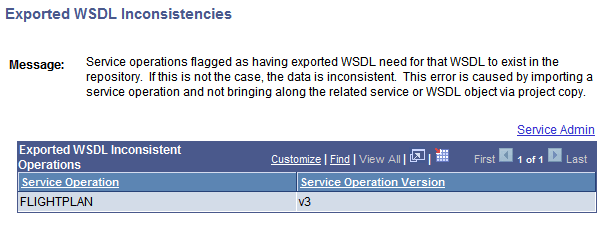
The page displays service operations that exist in the database that are flagged as having WSDL/WADL exported, yet no WSDL/WADL exists in the database for them. The Exported WSDL Inconsistencies page features a Service Admin link. Clicking the link opens the Service Administration-WSDL page (IB_HOME_PAGE7). The Service Administration-WSDL page provides options to clear the internal exported WSDL flag.