Defining Access Group Permissions
Use the Permission List Access Groups page (SCRTY_ADS_ACC_GRPS) to define the query tree and access groups, as well as the read and write privileges.
Note:
If the permission list grants full access to Upgrade, it is not necessary to include all of the access groups for a Copy from File. The access group security is always used when creating a data migration project.
Navigation:
This example illustrates the fields and controls on the Permission List Access Groups Page. You can find definitions for the fields and controls later on this page.
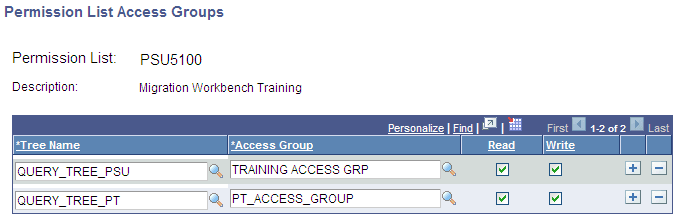
Access groups are nodes in a query tree, which you build with Query Access Manager. After you build a query tree, you give users access to one or more of its access groups. Then, they can generate queries on any tables in the access groups accessible to them.
ADS uses the query trees defined in Query Access Manager (PeopleTools, Security, Query Access Manager).
Users who have access to Data Set Designer can create data set definitions for any records in the database, however in order to copy or compare the data set, the user must have permission to an access group that contains the records to be copied or compared.
To add an access group to a permission list:
-
Open the permission list and select the .
-
Select a tree name.
-
Select the highest access group that the user can access.
The system displays access groups in the selected query tree only.
The access group that you select should be the highest-level tree group to which this permission list needs access.
-
Select the Read check box to grant the user access to the compare reports for this access group.
Note:
Read access is enough for Copy to file and Compare operations.
-
Select the Write check box to grant the user access copy data for this access group from a file.
Note:
Write access is required for Copy from file.
-
Save your changes.
Read Write Privileges
| Operation | Permission Required |
|---|---|
|
Copy to file |
Read |
|
Copy from file |
Write |
|
Compare from file |
Read |