Viewing Compare Reports
After the compare process has completed, a compare summary is displayed on the Project Definition page.
Navigation:
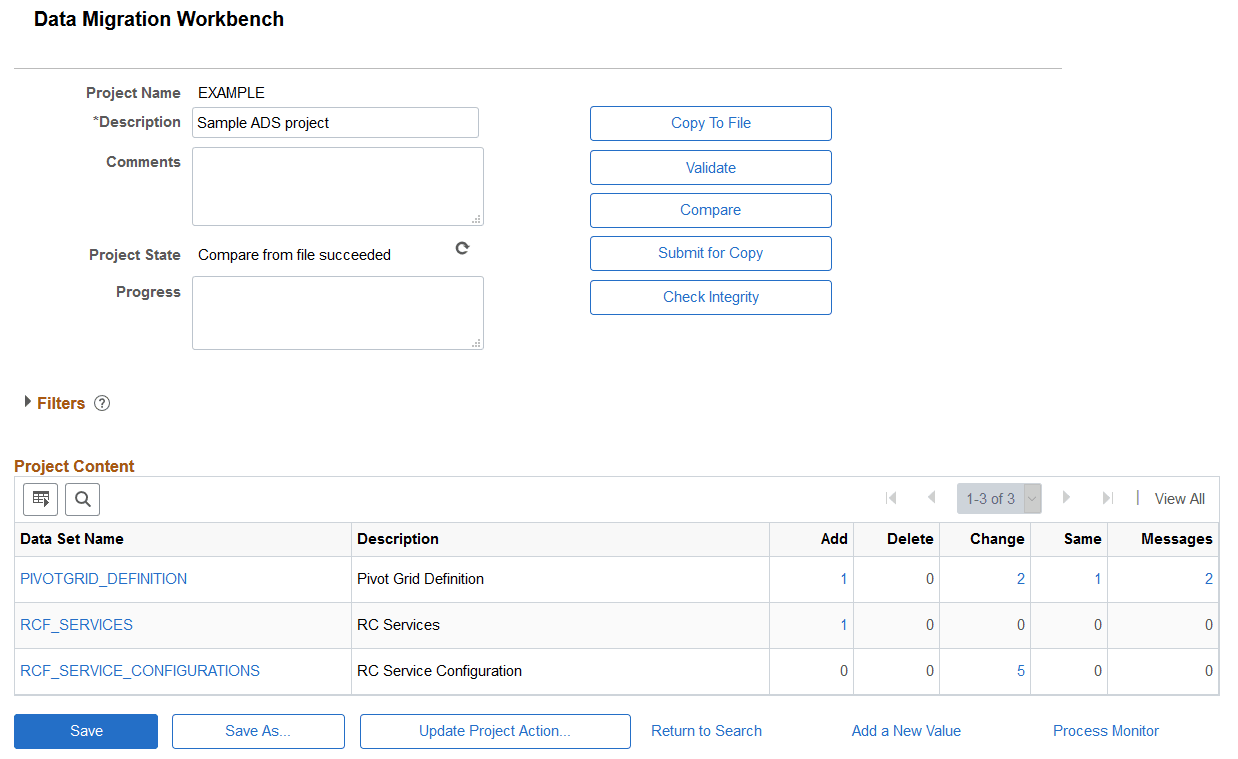
This example illustrates the fields and controls on the Project Summary page showing compare results. You can find definitions for the fields and controls later on this page.
Project Content Grid
On the target database, the Project Content grid displays all data set definitions currently in the project, but prevents changes to the project. Statistics are displayed for each data set definition in the project indicating the count of data set instances based on type. Reviewers can use the filters to further assist in determining where the changes or issues are located.
By clicking one of the hyperlinks displayed in the grid, you can drill in to view the data instances in the project for each data set. When compare or validation counts are displayed, they indicate a count of data set instances, not the number of fields compared or validated within each instance.
For large projects, use the Zoom Project Content and Search icons to find a specific data set.
Clicking on a compare or validation count will set the filter criteria on the content page appropriate to the selected count. Clicking on the data set name hyperlink will show the content page unfiltered.
| Field or Control | Description |
|---|---|
|
Data Set Name |
Each instance of the data set names is displayed as a hyperlink. When you click the hyperlink, the compare report for that data set instance is displayed. |
|
Add |
The count for additions is displayed as a hyperlink. Add indicates the root record in the data set instance is new and the action is copy. |
|
Delete |
The count for deletions is displayed as a hyperlink. Delete indicates that all records in the data set instance are to be deleted and the copy action is delete. |
|
Change |
The count for changes is displayed as a hyperlink. Change indicates that either the root record has changes, or another record in the data set instance is changed, added or deleted, and the copy action is copy. |
|
Same |
The count for same is displayed as a hyperlink. Same indicates that the data set instance is the same on both the source and target after customizations from the target are applied. If there are customizations that differ from the source value, the action is set to None and can be viewed in the details for the data set instance. If there are no customizations to be merged, same indicates the source and target have the same values. |
|
Messages |
The count for messages is displayed as a hyperlink. Only Warning and Error messages are displayed. |
Filters
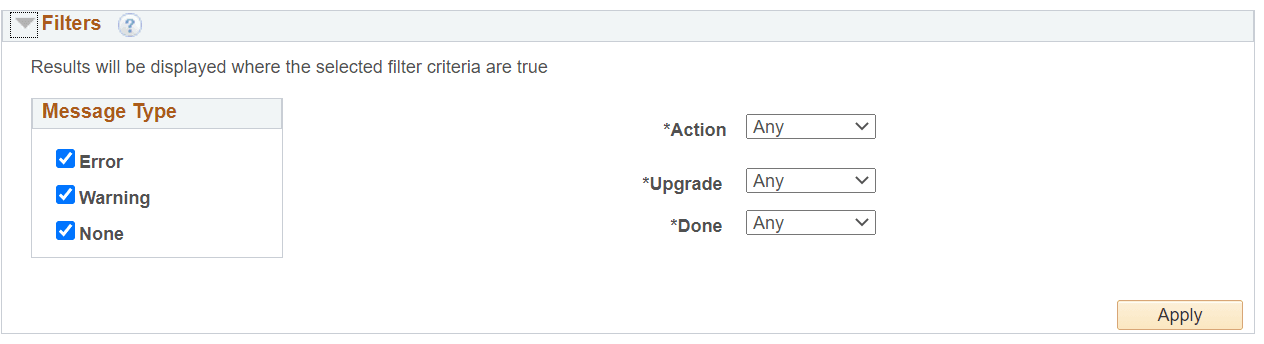
Expand and use the filters section to limit the result set shown in the Data Set Content grid. The filter will also alter the statistics shown for each data set object in the project. All criteria specified are cumulative.
This example illustrates the fields and controls on the Filters section. You can find definitions for the fields and controls later on this page.
| Field or Control | Description |
|---|---|
|
Message Type |
Select which message types to display. If there are any errors or warnings the Message column will indicate the total number of messages. |
|
Type |
Select the results types to display. |
|
Action |
Select which copy actions to display. Any will display the count for all copy actions. |
|
Upgrade |
Upgrade status is Yes or No. Any will display the count for all statuses. |
|
Done |
Done status is Yes or No. Any will display the count for all done statuses. |