Viewing Data Set Content
Use the Data Set content page to review and update the copy action for each instance of a data set.
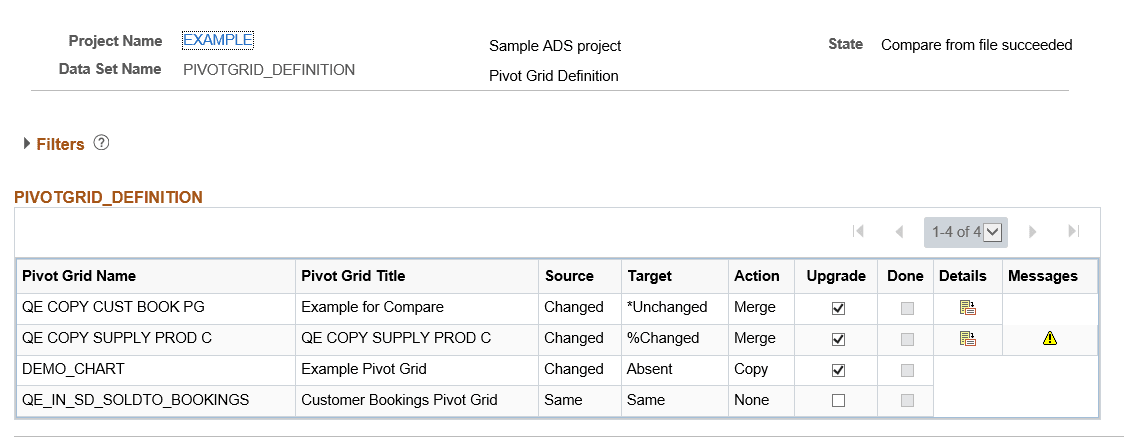
This example illustrates the fields and controls on the Compare Report page. You can find definitions for the fields and controls later on this page.
Filters
The same filters available on the Project Definition page are available for the data set instances. Use the filters to limit the data set content display. All criteria specified are cumulative.
Data Set Content
The data set content section provides the copy action and whether or not the copy has been done at the data set instance level.
| Field or Control | Description |
|---|---|
|
Source |
The source is the file that was loaded from Load Project from File. The source status is determined based on whether or not the data set is tracked, as well as the last user and date/time stamp. See Understanding Status |
|
Target |
Target is the database you are currently logged onto. The target status is determined based on whether or not the data set is tracked, as well as the last user and date/time stamp. See Understanding Status |
|
Action |
Indicates the copy action for the data set instance, the copy action will be:
|
|
Upgrade |
Indicates whether or not to perform the selected action. For Tracked Data Sets, whether or not the upgrade check box is selected, depends on the orientation selected. |
|
Done |
When the Copy from File has completed, the Done check box will be checked. |
|
Details |
Use the Details icon to view the details for the data set instance. Note: The details icon is displayed if there are differences based on the report filter selected when the Compare was run. |
|
Messages |
Click the message icon to view any messages for the data set instance. Note: Only errors and warning are displayed. |