Balancing Queues
Access the Balance queue page using the following navigation path:
This example illustrates the fields and controls on the Balance queue page. You can find definitions for the fields and controls later on this page.
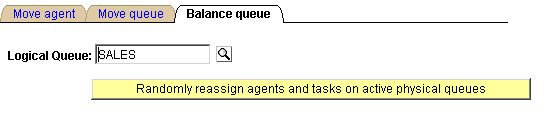
Over time, the distribution of agents and their associated skill levels, languages, and so on, across the physical queues belonging to a logical queue may change as agents are added or deleted. Rather than manually rebalancing the queue by moving individual agents, you can use the Balance queue page to randomly reassign agents and their open persistent tasks across all the active physical queues belonging to the selected logical queue.
| Field or Control | Description |
|---|---|
|
Logical Queue |
Select the logical queue across which agents and persistent tasks will be balanced. |
|
Randomly reassign agents and tasks on active physical queues |
Click to balance agents and tasks across the active physical queues for the selected logical queue. This action redistributes agents and tasks assigned to this logical queue across all active physical queues without regard to previous assignments. Ensure that agents assigned to the affected physical queues have shut down their MultiChannel Consoles. They are not logged off automatically. |