Chat Architecture
The following diagram illustrates the architecture of MCF chat and the flow of a chat session.
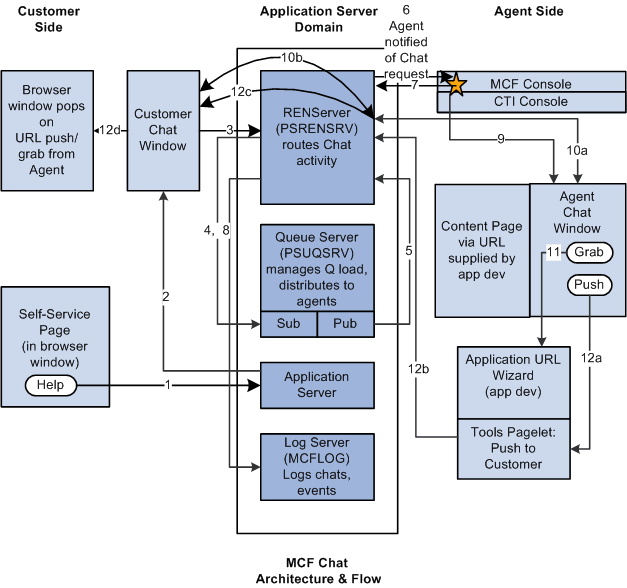
When a customer clicks the Help button on an application page:
-
InitChat() passes the following parameters to the application server:
-
Queue number.
-
Priority override.
-
Context page URL.
-
Query.
-
-
The application server posts to the REN server to notify the queue server that a customer chat is waiting.
The application server then returns the name and port of the REN server and the iScript to build the customer chat window.
-
The customer chat window appears and communicates with the REN server to receive all events on that chat topic.
-
The REN server notifies the queue server that a customer chat is waiting.
The queue server determines the appropriate agent according to workload, cost, agent availability, skill level, and language.
-
The queue server tells the REN server to notify the agent that the agent has been assigned a chat.
-
The REN server notifies the agent from the MultiChannel Console that the agent has been assigned a chat.
-
The agent, from the MultiChannel Console, notifies the REN server to notify the queue server that the agent has accepted the task.
-
The REN server notifies the queue that the agent has accepted the task.
-
The MultiChannel Console displays an agent chat window.
The agent responds to inquiry.
-
Agent to customer two-way communication is mediated by the REN server.
-
If the agent chooses to grab a URL, the Grab button invokes the application URL wizard.
-
If the agent chooses to push a URL, the Push button invokes a pagelet (labeled with an A in the diagram) to push a selected URL through the REN server (labeled with a B in the diagram) and customer chat window (labeled with a C in the diagram) to a new browser window.
The entire chat session can be logged through the MCF log server (labeled with a dotted line in the preceding diagram).