Email Architecture
This diagram illustrates the architecture of MCF email and the flow of email processing.
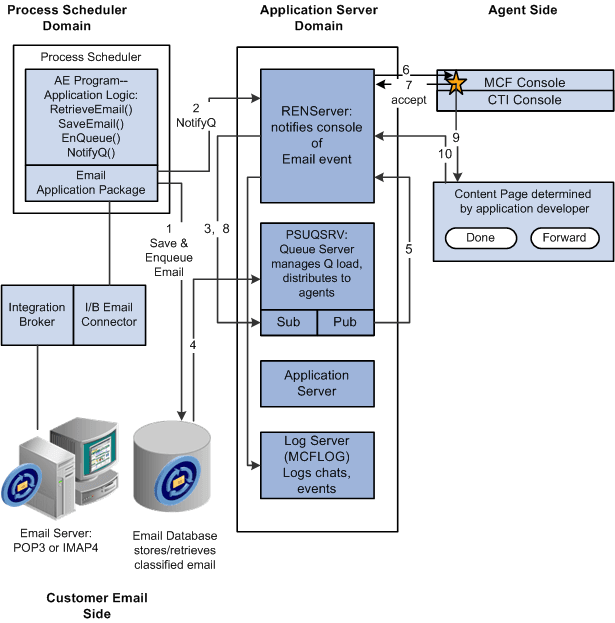
When a customer sends an email:
-
A PeopleSoft Application Engine program uses the MCF email application package classes and PeopleCode built-in functions to save and enqueue email in a database.
-
The PeopleSoft Application Engine program notifies the REN server that email has been enqueued.
-
The REN server notifies the queue server of the waiting email.
-
The queue server retrieves email information required to determine appropriate routing from the database.
The queue server determines the appropriate agent to handle each email according to workload, cost, agent availability, skill level, and language.
-
The queue server tells the REN server to notify the agent that the agent has been assigned an email.
-
The REN server notifies the agent from the MultiChannel Console that the agent has been assigned an email.
-
The agent, from the MultiChannel Console, notifies the REN server to notify the queue server that the agent has accepted the task.
-
The REN server notifies the queue that the agent has accepted the task.
-
The MultiChannel Console displays an agent email window, as determined by the application developer.
The agent responds to the email.
-
The agent's resolution of the task is communicated back to the REN server by either the Done or Forward button.
Email events can be logged to a database by the MCF log server.