Configuring PeopleSoft MCF Clusters
Access the UQ Cluster page using the following navigation path:
(MCF_UQCLUSTER)
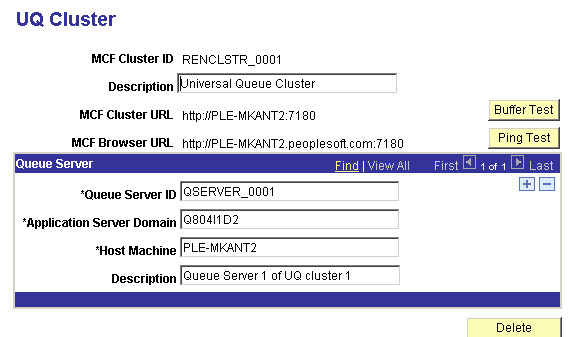
This example illustrates the fields and controls on the UQ Cluster page. You can find definitions for the fields and controls later on this page.
| Field or Control | Description |
|---|---|
|
MCF Cluster ID |
Displays the MCF cluster ID. |
|
MCF Cluster URL |
Displays the URL for the REN server that serves this cluster. This is the URL that is used by internal processes. If the MCF cluster is served by a REN server cluster, the cluster URL is that of the switch or load balancer in front of the clustered REN servers. |
|
Buffer Test |
Click to initiate a test of the REN server's ability to break up and send a large file using multiple internal buffers. The buffer test does not depend on specified domain names, so you can use it to verify that RENSRV is running on the network. |
|
MCF Browser URL |
Displays the URL for a REN server cluster that serves this MCF cluster for external clients and for agent chat. The browser URL may be different from the cluster URL, which should not have to go through any firewall, reverse proxy server, or other outward-facing security barrier. |
|
Ping Test |
Click to initiate a test of the REN server that is specified in the URL fields. Failure may indicate that a URL is incorrectly specified. |
|
Delete |
Click to delete the entire MCF cluster. No active agents or tasks should be on the cluster. |
Note:
If the cluster's queue server configuration is changed, changes to the actual application server domains must be made manually using PSADMIN. For example, if a cluster member (queue server) is removed, the affected application server domain must be shut down and reconfigured (set the MCF Servers field to No) using PSADMIN. If the cluster URL is changed, all associated queue server domains must be shut down and rebooted.
Queue Server
An MCF cluster can consist of a primary queue server and any number of backup servers.
Each cluster requires a minimum of one queue server. The primary queue server is the first queue server started, and the remaining queue servers are backups. If the primary queue server fails, the system determines the subsequent primary queue server among the backups.
You can add a queue server to a cluster by adding a new row. Before removing a queue server, ensure that it is not the primary, and then shut down its domain. Then click Delete (the minus sign).
If a domain is started with a queue server that does not belong to a cluster, the universal queue server and MCF log server poll the MCF configuration tables indefinitely until the queue server is assigned to a cluster.
| Field or Control | Description |
|---|---|
|
Queue Server ID |
Enter a unique identifier for each queue server to identify its entries in the database control tables. The log server process that is paired with this queue server uses this same ID to identify its entry in the log cluster table. |
|
Application Server Domain |
Enter the application server domain of which this queue server is a member. |
|
Host Machine |
Enter the name of the application server host machine. Note: In some cases, the name of the server may be the fully qualified host name. |