Configuring Signed and Encrypted Emails
To facilitate the decryption of signed and encrypted emails in PeopleSoft, you must configure the existing PeopleSoft pages by adding public certificates, private keys, and private key passphrases to the database.
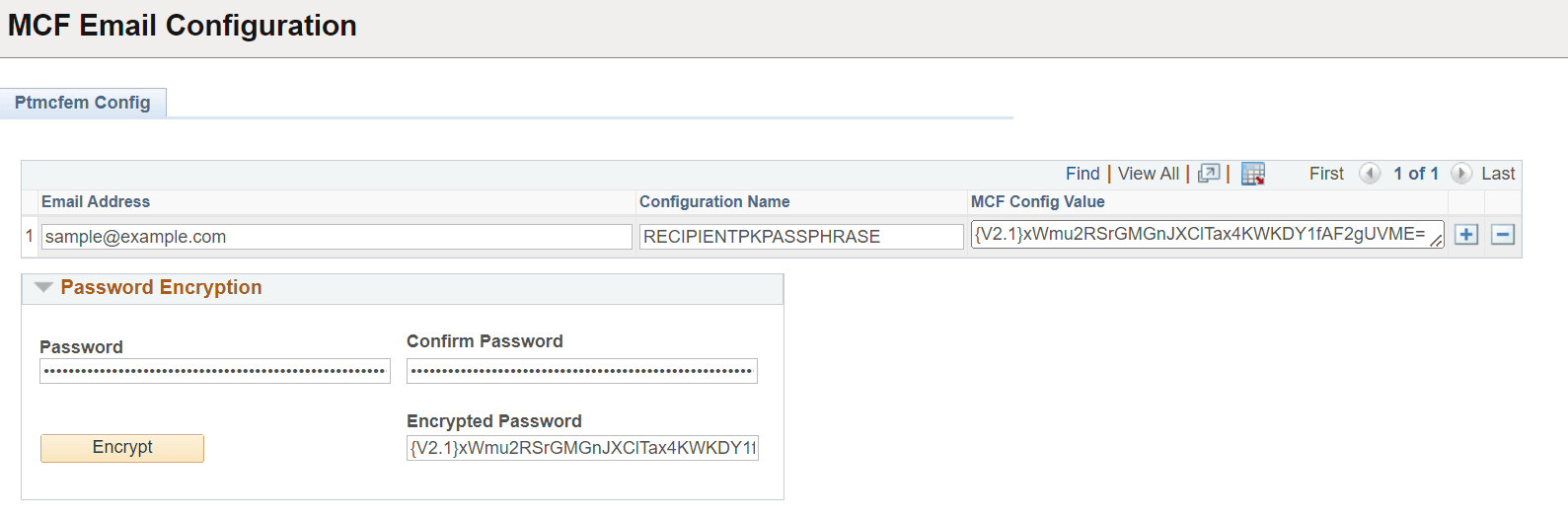
This example illustrates the fields and controls on the MCF Email Configuration page. You can find definitions for the fields and controls later on this page.
| Field or Control | Description |
|---|---|
|
Email Address |
Enter the email address of the recipient. |
|
Configuration Name |
Enter the configuration name. For inbound encrypted emails, this is always RECIPIENTPKPASSPHRASE. Private keys that are used with outbound emails are filed under the configuration name SENDERPKPASSPHRASE. |
|
Password |
Enter the password for encryption. |
|
Confirm Password |
Confirm the password for encryption. |
|
Encrypted Password |
Click Encrypt button to generate the encrypted password. |
|
MCF Config Value |
Copy and paste the encrypted password. |