Using the MailStore - DB Page
Access the MailStore - DB page using the following navigation path:
This example illustrates the fields and controls on the MailStore - DB page. You can find definitions for the fields and controls later on this page.
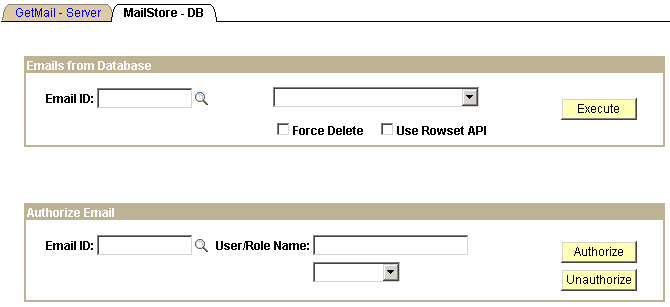
View an example of how to access emails from the database (how to retrieve and delete email) and how to authorize email attachments for viewing or deletion using the PT_MCF_MAIL application package provided with PeopleSoft MCF.
| Field or Control | Description |
|---|---|
|
Email ID |
Enter the PeopleSoft email ID (not to be confused with the UID) with which the email was saved to the database. |
Emails from Database
Enter an email ID, select an action from the drop-down list box, and then click Execute to perform the selected action.
| Field or Control | Description |
|---|---|
|
Delete Email from Database |
Deletes the specified email from the database and any corresponding attachments from the repository. |
|
Retrieve Email |
Retrieves the specified email from the database and writes it to the output file mcfdata.out. |
|
Force Delete |
Select after entering Delete Email from Database to force the deletion even if an error occurs when deleting associated attachments from the repository. |
|
Use Rowset API |
Select to use the rowset-based GetMail API. Deselect to use the new Mail Classes API. |
Authorize Email
Enter an email ID, a user role or name, and click Authorize or Unauthorize to perform the specified action.
| Field or Control | Description |
|---|---|
|
Email ID |
Enter the PeopleSoft email ID (not to be confused with the UID) with which the email was saved to the database. |
|
User/Role Name |
Enter a PeopleSoft user ID or role to be authorized or unauthorized to view the attachment associated with the selected email. After entering an ID or role, select User or Role, as appropriate, from the drop-down list box. |
Related Topics