Using the Email Sample Page
Access the Email page using the following navigation path:
Note:
This page is available using both queue server and third-party routing server.
This example illustrates the fields and controls on the Email page.
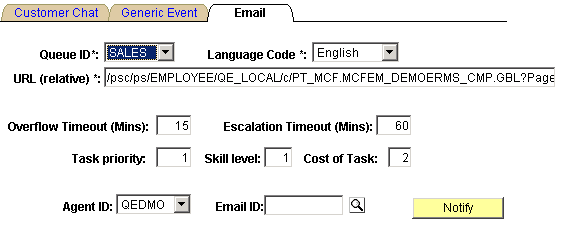
The email sample pages are intended for demonstration purposes and should not be used in production.
EnQueue() and NotifyQ() can also be called from PeopleSoft Application Engine batch programs.
See PeopleCode Language Reference: EnQueue function and PeopleCode Language Reference: NotifyQ function.
Note:
For you to fully demonstrate the functionality of the Email sample page, an email must be read and written to the email database using the GetMail - Server sample page.
To process a sample email:
-
Open the Queue ID drop-down list box and select the queue that you are logged on to.
-
Open the Agent ID drop-down list box and select the agent ID that you are logged on with.
-
Click Notify.
-
On the MultiChannel Console, click the flashing email notification icon to accept the email.
The email window appears.