Using the Email Window
The format of the email window is determined by application developers. PeopleSoft supplies a sample email event window to demonstrate available functionality.
Configure the size and initial location of the email event window on the agent's Window Configuration page.
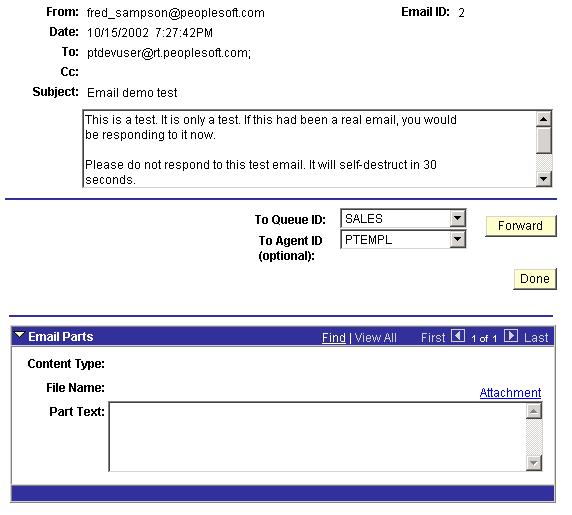
This example illustrates the fields and controls on the Email window. You can find definitions for the fields and controls later on this page.
| Field or Control | Description |
|---|---|
|
To Queue ID |
To forward the email to another queue, select a queue ID from the drop-down list box and click Forward. |
|
To Agent ID |
To forward the email to another agent, select an agent ID from the drop-down list box and click Forward. |
|
Forward |
Click to forward the email to the specified queue or agent. This button demonstrates the functionality of the Forward() built-in function. |
|
Done |
Click to quit the email and remove it from the queue. The Done button demonstrates the functionality of the DeQueue() built-in. |
Email Parts
If an email has been divided into parts stored in the email database, or has an attachment, they can be accessed here.