Using the Generic Event Window
The format of the generic event window is determined by application developers. PeopleSoft supplies a sample generic event window to demonstrate the available functionality, including the DeQueue() built-in.
Configure the size and initial location of the generic event window on the Agent Window Configuration page:
This example illustrates the fields and controls on the Generic Event window. You can find definitions for the fields and controls later on this page.
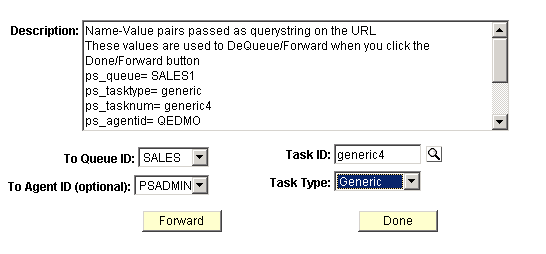
| Field or Control | Description |
|---|---|
|
Description |
Displays text from the generic event. |
|
To Queue ID |
Select a queue to which the generic event will be forwarded. |
|
Task ID |
Select the task ID of the generic event to forward. |
|
To Agent ID |
Select the agent ID to whom the generic event will be forwarded. |
|
Task Type |
Select the task type of the generic event to be forwarded. |
|
Forward |
Click to send the generic event to the selected agent or queue. This button demonstrates the functionality of the Forward() built-in function. |
|
Done |
Click to notify the real-time event notification (REN) server that you are done with this task. A message asks if you want to close the window. The Done button demonstrates the functionality of the DeQueue() built-in function. |
Related Topics