Using the Generic Event Sample Page
Access the Generic Event page using the following navigation path:
Note:
This page is available using both queue server and third-party routing server.
This example illustrates the fields and controls on the Generic Event page.
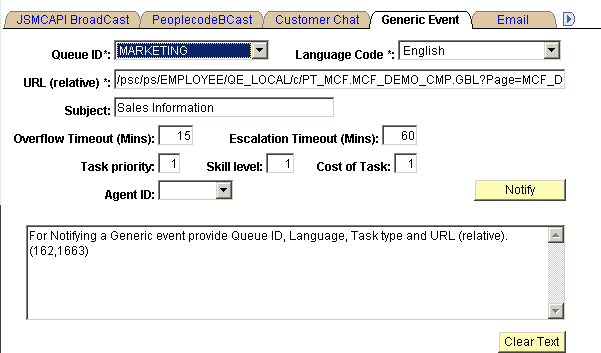
This page demonstrates a generic persistent event using the EnQueue() and NotifyQ() built-in functions, including required and optional parameters.
This page is not intended for production use. On a typical application page, the developer includes an Enqueue or similar button that calls the EnQueue() built-in function and passes required parameters, including the context of the request. The sample customer chat page demonstrates values that can be included in the EnQueue() parameters. The user may not be prompted for any information.
To run a sample generic event:
-
Access the MultiChannel Console.
-
Open the Generic Event page.
-
Open the Queue ID drop-down list box, and select the queue that you are logged on to.
-
Open the Agent ID drop-down list box, and select the agent ID that you are logged on with.
-
Select Generic for the task type.
-
Click Notify.
-
On the MultiChannel Console, click the flashing event notification icon to accept the event.
The Generic Event window appears.