Defining PeopleSoft MCF Queues for a Third Party
Access the Queue page using the following navigation path:
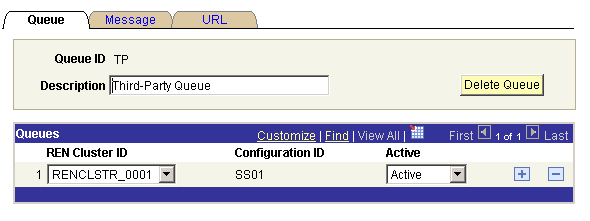
This example illustrates the fields and controls on the Queue page. You can find definitions for the fields and controls later on this page.
| Field or Control | Description |
|---|---|
|
Queue ID |
Queue IDs must be alphanumeric, but they may include underscore characters. |
|
Configuration ID |
Displays the configuration ID. Note: This value is required only for CTI configuration. To select the configuration ID from lookup, define the configuration ID when you are configuring CTI. |
|
Delete Queue |
Click to remove this queue. Deleting a queue means that no work or agents can be assigned to the queue and the queue is removed from all agents' available queues. |
|
Cluster ID |
The Cluster ID field identifies the cluster that services this queue. |
|
Active |
Select Active or Inactive from the drop-down list box. The queue server does not send new tasks to an inactive queue. Agents and existing tasks remain on an inactive queue. To receive new queued tasks, the queue must be active. Active and inactive statuses support “follow-the-sun” practices. For example, SALES1 could be supported in the London office, and SALES2 could be supported in the San Francisco office when the London office is closed by activating and inactivating the appropriate queues. |