Defining Queues
Access the Queues page using the following navigation path:
This example illustrates the fields and controls on the Queues page. You can find definitions for the fields and controls later on this page.
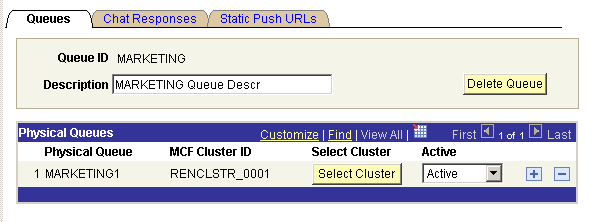
| Field or Control | Description |
|---|---|
|
Queue ID |
Queue IDs must be alphanumeric, cannot end in a numeral, but can include underscore characters. |
|
Delete Queue |
Click to remove this queue. Deleting a logical queue means that no work or agents can be assigned to the queue, and the queue is removed from all agents' available queues. You can delete a logical queue only if all of its constituent physical queues are inactive and have no tasks. Verify that no application code assigns tasks to a queue before deleting the queue. All agents that are assigned to the child physical queue will receive a message notifying them to sign out of their MultiChannel Consoles when the logical queue is deleted. |
|
Physical Queue |
Identifies that part of a logical queue that is serviced by the selected MCF cluster. Physical queue IDs always end in a number, for example, SALES2. The physical queue identifier automatically increments by one for each physical queue that is added. Physical queue IDs are automatically generated. The maximum number of physical queues is nine. |
|
MCF Cluster ID |
Identifies the MCF cluster that services this physical queue. Click Select Cluster to select from configured MCF clusters. Each MCF cluster can service only one physical queue per logical queue. For example, an MCF cluster could service physical queue SALES1 or SALES2, but not both. An MCF cluster can service multiple physical queues belonging to different logical queues. For example, an MCF cluster could service physical queues SALES1, MARKETING2, and COBOL1. |
|
Select Cluster |
Click to select a cluster from a list of available MCF clusters. The selected MCF cluster services this physical queue. The primary queue server in this cluster manages tasks and agents that are assigned to this physical queue. |
|
Active |
Select Active or Inactive from the drop-down list box. The queue server does not send new tasks to an inactive physical queue. Agents and existing tasks remain on an inactive physical queue. The physical queue must be active to receive new queued tasks. Only inactive physical queues can be deleted from a logical queue. Inactivate a physical queue and complete or transfer all assigned tasks before deleting the physical queue. Active and inactive status support follow-the-sun practices. For example, an organization could support SALES1 in the London office, and SALES2 in the San Francisco office when the London office is closed by activating the appropriate queues. |