Specifying Miscellaneous Parameters
Access the Miscellaneous page using the following navigation path:
This example illustrates the fields and controls on the Miscellaneous page. You can find definitions for the fields and controls later on this page.
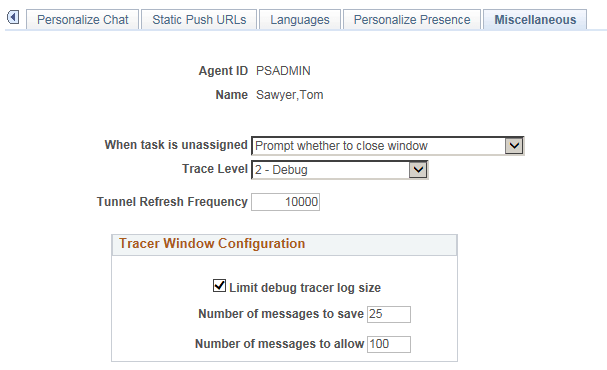
| Field or Control | Description |
|---|---|
|
When task is unassigned |
Select from the following values the action that occurs when a task that is assigned to an agent is unassigned:
|
|
Trace Level |
Select from the following log trace levels:
If a value other than 0 is selected, a tracer window appears to display activities and events on the chat or MultiChannel Console for debugging purposes. |
|
Tunnel Refresh Frequency |
Specify the number of communications to the Real-time Event Notification (REN) server before a refresh occurs for a browser-based client. Default refresh frequency is 10000. You can configure the field depending on the memory available to the client. A higher value will use more memory, but will allow a longer time between refreshes. |
|
Limit debug tracer log size |
This check box is enabled when the value entered for Trace Level is not 0. Select this check box to enable the agent to clear the tracer log based on Number of messages to save and Number of messages to allow. If the check box is deselected, the tracer log will not be cleared and the Number of messages to save and Number of messages to allow will be disabled. |
|
Number of messages to save |
Specify the minimum number of recent tracer log messages that should be maintained in the tracer window. |
|
Number of messages to allow |
Specify the maximum number of tracer log messages that will be maintained in the tracer window. |
Note:
Number of messages to save and Number of messages to allow fields are required if the Limit debug tracer log size check box is selected.
Limit Debug Tracer Log Size Example
This table lists the values entered on the Miscellaneous page:
| Field | Value |
|---|---|
|
Trace Level |
2 - Debug |
|
Limit debug tracer log size |
Selected |
|
Number of messages to save |
25 |
|
Number of messages to allow |
100 |
Based on these values, the first 75 messages will be cleared from the tracer window after 100 messages are logged. It will retain the most recent 25 messages for the agents reference. This process will repeat for every 100 messages that are logged in the tracer. The maximum number of messages is the tracer window at any one point in time is 100.