Using the MCF Broadcast Page
This section discusses how to use the JSMCAPI Broadcast page for the third party.
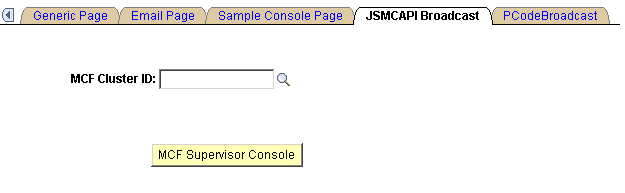
This example illustrates the fields and controls on the JSMCAPI Broadcast page. You can find definitions for the fields and controls later on this page.
| Field or Control | Description |
|---|---|
|
MCF Cluster ID |
Select the REN server cluster on which to test the MCF Supervisor console. Note: The MCF Supervisor console is specific to the REN cluster Id selected. |
|
MCF Supervisor Console |
Click to initiate the supervisor console. Note: To demonstrate the MCF Supervisor console, you must have MCF servers, both queue and log servers, running and communicating with the specified REN server cluster. |
After you click MCF Supervisor Console, a new browser window appears that displays the sample supervisor console.
Note:
To enable the new browser window to appear, disable any pop-up blocking software for your browser.
Related Topics