Using the Outbound Call Page
Access the Outbound Call page using the following navigation path:
This example illustrates the fields and controls on the Outbound Call page. You can find definitions for the fields and controls later on this page.
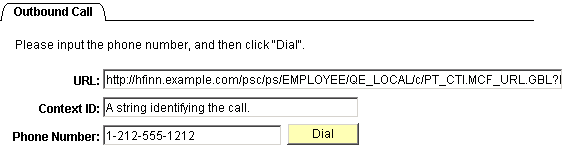
The Outbound Call page is an example of how you can customize an application page to enable a user to direct the CTI Console to dial a telephone number displayed on that page. The outbound calling demonstration works only when the CTI Console is enabled and the user has registered with the CTI vendor.
| Field or Control | Description |
|---|---|
|
URL |
Enter the URL of a page to display when dialing out. |
|
Context ID |
Enter a string to attach to the call as outbound context. |
|
Phone Number |
Enter the telephone number that you want to dial. This field accepts numeric digits only. Do not enter special characters, such as - (hyphen), . (period), or other separators. |
|
Dial |
Click to dial the telephone number that you entered. |
Related Topics