AddDoc method: Business Interlink class
Syntax
AddDoc(docname)Description
The AddDoc method adds a document to an input structure. The added document is an input parameter for a Business Interlink object that is not of simple type (such as integer or string). You must add the document to the input structure before you can add values to its members with AddValue.
Parameters
| Parameter | Description |
|---|---|
|
docname |
The name of the document that AddDoc adds to the structure. |
Returns
The document added to the BIDocs input document.
Example
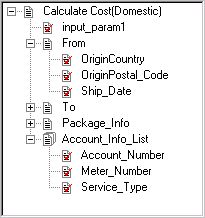
In the following example, the input structure for Calculate Cost, or the root level document, is created with the GetInputDocs method. (To create, or add, more input structures, use AddNextDoc.) The Calculate Cost input parameter From is a document, so the AddDoc method adds it to the input document.
Local Interlink &QE_COST;
Local BIDocs &CalcCostIn;
Local BIDocs &FromDoc, &ToDoc, &PackageDoc, &AccountDoc;
Local number &ret, &retinput;
&QE_COST = GetInterlink(Interlink.QE_COST_EX);
&CalcCostIn = &QE_COST.GetInputDocs("");
&ret = &CalcCostIn.AddValue("input_param1","value");
&FromDoc = &CalcCostIn.AddDoc("From");
&ret = &FromDoc.AddValue("OriginCountry", "United States");
&ret = &FromDoc.AddValue("OriginPostal_Code", &ORIGIN);
&ret = &FromDoc.AddValue("Ship_Date", &SHIPDATE);
/* Call AddDoc and AddValue for To, Package_Info, and Account_Info_List (code not⇒
 shown) */
The following shows the input structure for this example. It contains five input parameters: input_param1, From, To, Package_Info, and Account_Info_List. This is a version of the Federal Express plug-in that was modified for this example (input_param1 was added, Account_Info was modified to be a list).