AddValue method: Business Interlink class
Syntax
AddValue(paramname, value)Description
The AddValue method adds a value to a member of a document within the input structure for a Business Interlink object.
Parameters
| Parameter | Description |
|---|---|
|
paramname |
The name of the member of the document that is having a value added to it. |
|
value |
The value that is added. This can be a constant, a variable, or a record field. The data type can be String, Integer, Double, Float, Time, Date, or DateTime. |
Returns
This method returns an integer. The values are:
| Value | Description |
|---|---|
|
0 |
eNoError. The method succeeded. |
|
1 |
eNO_DOCUMENT. The document referenced by this method does not exist. |
|
2 |
eDOCLIST_OUT_RANGE. You tried to access a document in a list, but the document list is out of range. For example, if a document list contains five documents, and then you call GetDoc/GetOutputDocs once, you can call GetNextDoc four times; the fifth time results in this error. |
|
3 |
eDOCUMENT_UNINITIALIZED. Internal error. |
|
4 |
eNOT_DOCUMENTTYPE. You tried to perform an operation upon a parameter that is not a document type. |
|
5 |
eNOT_LISTTYPE. You tried to perform a GetNextDoc or AddNextDoc upon a document that is not a list. |
|
7 |
eNOT_BASICTYPE. You tried to perform a GetValue or AddValue upon a parameter that is not of basic type: Integer, Float, String, Time, Date, DateTime. |
|
8 |
eNO_DATA. You tried to retrieve data from a document that contained no data. |
Example
In the following example, the Business Interlink object name is QE_COST.
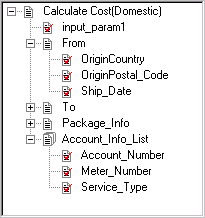
In the following example, the input structure for Calculate Cost, or the root level document, is accessed with the GetInputDocs method. (To create, or add, more input structures, use AddNextDoc.) The Calculate Cost input parameter From is a document, so the AddDoc method adds it to the input structure. Then the AddValue method adds values to each of the From document members.
Local Interlink &QE_COST;
Local BIDocs &CalcCostIn;
Local BIDocs &FromDoc, &ToDoc, &PackageDoc, &AccountDoc;
Local number &ret;
&QE_COST = GetInterlink(Interlink.QE_COST_EX);
/* Get some values for input, such as &ORIGIN (code not shown) */
&CalcCostIn = &QE_COST.GetInputDocs("");
&ret = &CalcCostIn.AddValue("input_param1","value");

&FromDoc = &CalcCostIn.AddDoc("From");
&ret = &FromDoc.AddValue("OriginCountry", "United States");
&ret = &FromDoc.AddValue("OriginPostal_Code", &ORIGIN);
&ret = &FromDoc.AddValue("Ship_Date", &SHIPDATE);

/* Call AddDoc, AddValue for Package, Account_Info_List, and also call AddNextDoc⇒
 for Account_Info_List (code not shown) */
The following shows the input structure for this example. It contains five input parameters: input_param1, From, To, Package_Info, and Account_Info_List.