BulkExecute method: Business Interlink class
Syntax
BulkExecute(RECORD.inputrecname [, RECORD.outputrecname] [, {user_process_inst | user_operid}])Description
The BulkExecute method uses the data in the specified record to populate the input buffer, copying like-named fields. Then the method executes, and, optionally, fills the record specified by outputrecname with data from the Business Interlink output buffer. BulkExecute results in significantly faster performance for transactions that process large amounts of data. Instead of adding one input row at a time, then fetching the values one at a time, you might write the data to a staging table, use the BulkExecute method and then read the data from the output table. This would be especially effective in Application Engine programs that process sets of data rather than individual rows.
This method assumes that the names of the fields in the record match the names of the inputs (or outputs) defined in the Business Interlink Definition. If there is no field in the inputrecname for a Business Interlink input parameter, the parameter’s default value is used. If no default is specified, an empty string is passed. You must ensure that this default value is legitimate.
Fields in the output buffer are matched against the fields specified in the output record. You do not have to specify an output record. If you don’t specify an output record, the output buffers are not be populated.
If you specify an output record, and if you have fields in the output record that are not specified as output parameters, they aren't populated with the BulkExecute method. In addition, they shouldn’t be set as NOT NULL, otherwise inserts fail.
Note:
Before you use this method, you should flush the record used for output and remove any residual data that might exist in it.
If you specify an output record, and you want to use the output record for error checking, you must add the following fields to your output record:
-
RETURN_STATUS
-
RETURN_STATUS_MSG
Note:
The field names in the output record must match these names exactly.
Then you must mark one or more input parameters as "key fields" in the Business Interlink definition (using the BulkExecute ID check box.) The value of these key fields are copied to the output record, and you can use these fields to match error messages with input (or output) rows.
To order your input (and output) rows, you must add the BI_SEQ_NUM column to both the input and output table:
Note:
The field name in your input and output records must match this name exactly.
The input rows are read in the order of numbers in BI_SEQ_NUM, and the output rows are generated using the same order number.
This method automatically executes, so you don’t need to use the Execute method with this method.
Whether this method halts on execution depends on the setting of the StopAtError configuration parameter. The default value is True, that is, stop if the error number returned is something other than a 1 or 2. This configuration parameter must be set before using the BulkExecute method.
Parameters
| Parameter | Description |
|---|---|
|
RECORD.inputrecname |
Specify a record (SQL table) that contains the data to populate the input buffer of the Business Interlink. |
|
RECORD .outputrecname |
Specify a record (SQL table) that will hold the data that populates the output buffer of the Business Interlink. This is optional; it is often used to error check the input. |
|
user_process_inst | user_operid |
This is an optional parameter that allows either different Application Engine programs or different clients to populate the same RECORD. outputrecname at the same time. |
|
|
For user_process_inst, the parameter takes an integer.RECORD. outputrecname must have a PROCESS_INSTANCE field. The PROCESS_INSTANCE field is used to identify the Application Engine program that is using this Business Interlink. You can use the %PROCESS_INSTANCE variable to populate user_process_inst. |
|
|
For user_operid, the parameter takes a string.RECORD. outputrecname must have an OPERID field. The OPERID field is used to identify the client who is using this Business Interlink. You can use the %OPERID variable to populate user_operid. |
Returns
The following are the valid returns:
| Value | Description |
|---|---|
|
1 |
The Business Interlink object executes successfully |
|
2 |
The Business Interlink object failed to execute |
|
3 |
Transaction failed |
|
4 |
Query failed |
|
5 |
Missing criteria |
|
6 |
Input mismatch |
|
7 |
Output mismatch |
|
8 |
No response from server |
|
9 |
Missing parameter |
|
10 |
Invalid user name |
|
11 |
Invalid password |
|
12 |
Invalid server name |
|
13 |
Connection error |
|
14 |
Connection refused |
|
15 |
Timeout reached |
|
16 |
Unequal lists |
|
17 |
No data for output |
|
18 |
Output parameters empty |
|
19 |
Driver not found |
|
20 |
Internet connect error |
|
21 |
XML parser error |
|
22 |
XML deserialize |
Example
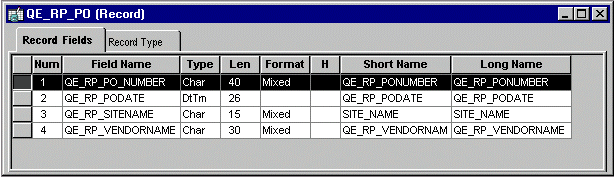
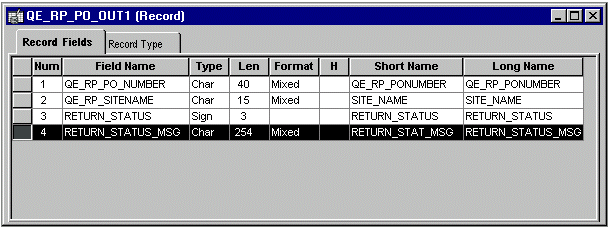
This image is an example of input record for BulkExecute. Here are two PeopleSoft records that could be used as input and output records for BulkExecute. The key fields in the input record, which need to have the BulkExecute ID check box checked in Application Designer, are QE_RP_PO_NUMBER and QE_RP_SITENAME. These key fields are used both for input and output.
This image is an example of output record for BulkExecute.
The following is an example of Business Interlink inputs for BulkExecute. Here are the corresponding inputs and outputs for a Business Interlink that has had its inputs and outputs renamed to match the field names in the records. The inputs and outputs have been renamed where necessary to match the record field names.
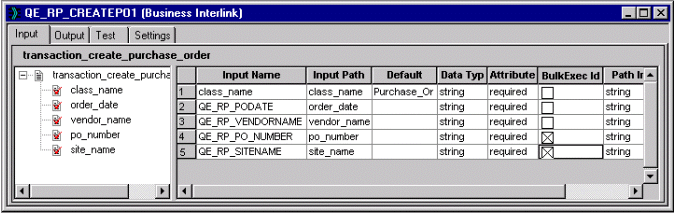
The following image is an example of Business Interlink inputs for BulkExecute.
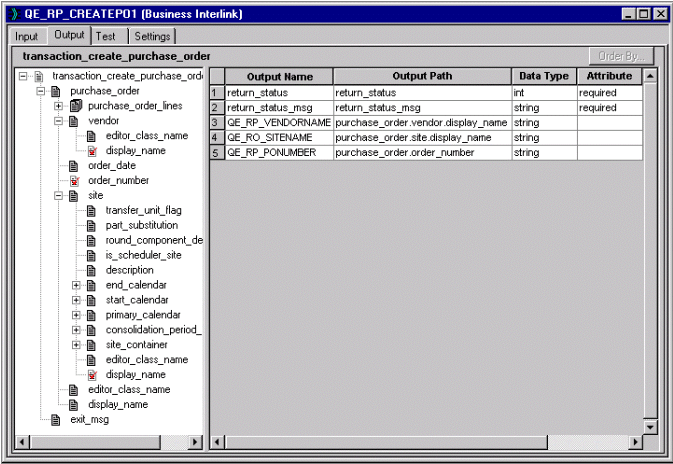
The PeopleCode program using these records could contain the following code to run BulkExecute.
Local Interlink &CREATE_PO;
Local number &EXECRSLT;
&CREATE_PO = GetInterlink(INTERLINK.QE_RP_CREATEPO1);
/* The next three lines set configuration parameters, which are not shown in the⇒
 previous examples. */
&CREATE_PO.SERVER_NAME = "bc1";
&CREATE_PO.RSERVER_HOST = "192.0.2.1";
&CREATE_PO.RSERVER_PORT = "2200";
&EXECRSLT = &CREATE_PO.BulkExecute(RECORD.QE_RP_PO, RECORD.QE_RP_PO_OUT1);
Related Topics