FetchIntoRowset method: Business Interlink class
Syntax
FetchIntoRowset(&Rowset)Description
The FetchIntoRowset method copies the data from the output buffer into the specified rowset, copying like-named fields. This method assumes that the names of the fields in the rowset match the names of the outputs defined in the Business Interlink definition, and that the structure is the same.
Note:
Before you use this method, you should flush the rowset used for output and remove any residual data that might exist in it.
Use this method only if you have a hierarchical data structure and you want to preserve the hierarchy. Otherwise, use BulkExecute or FetchIntoRecord.
Parameters
| Parameter | Description |
|---|---|
|
&Rowset |
Specify rowset object that you want to populate with data from the output buffers. This must be an existing, instantiated rowset. |
Returns
Number of rows fetched if one or more non-empty rows are returned.
If an empty row is returned, that is, every if field is empty except the return_status and return_status_msg fields, this method returns one of the following error messages:
| Value | Description |
|---|---|
|
0 |
No error |
|
1 |
NoInterfaceObject |
|
2 |
ParamCountError |
|
3 |
IncorrectParameterType |
|
4 |
NoColumnForOutputParm |
|
5 |
NoColumnForInputParm |
|
6 |
BulkInsertStartFailed |
|
7 |
BulkInsertStopFailed |
|
8 |
CouldNotCreateSelectCursor |
|
9 |
CouldNotCreateInsertCursor |
|
10 |
CouldNotDestroySelectCursor |
|
11 |
CouldNotDestroyInsertCursor |
|
12 |
InputRecordDoesNotExist |
|
13 |
OutputRecordDoesNotExist |
|
14 |
ContainEmptyRow |
|
15 |
SQLExecError |
|
201 |
FieldTooLarge |
|
202 |
IgnoreSignNumber |
|
203 |
ConvertFloatToInt |
Example
The following an image of EMPLOYEE_CHECKLIST Page order. The example uses the rowset on level one from the EMPLOYEE_CHECKLIST page. A PeopleCode program running in a field on level zero in that page can access the level one (child rowset).
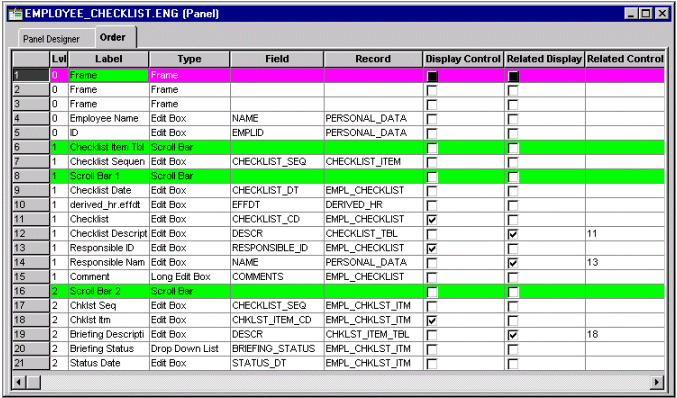
EMPL_CHECKLIST is the primary database record for the level one scrollbar on the EMPLOYEE_CHECKLIST page. The following PeopleCode accesses the level one rowset using EMPL_CHECKLIST. The Business Interlink object name is QE_BI_EMPL_CHECKLIST. This Business Interlink object uses the level one rowset as its input and its output.
The InputRowset method uses this rowset as input for QE_BI_EMPL_CHECKLIST. Then a blank duplicate of the rowset is created with CreateRowset, and then the output of QE_BI_EMPL_CHECKLIST is fetched into the blank rowset with FetchIntoRowset.
&MYROWSET = GetRowset(SCROLL.EMPL_CHECKLIST);
&ROWCOUNT = &QE_BI_EMPL_CHECKLIST.InputRowset(&MYROWSET);
&RSLT = &QE_BI_EMPL_CHECKLIST.Execute();
/* do some error processing */
&WorkRowset = CreateRowset(&MYROWSET);
&ROWCOUNT = &QE_BI_EMPL_CHECKLIST.FetchIntoRowset(&WorkRowset);
If &ROWCOUNT = 0 Then
/* do some error processing */
Else
   /* Process the rowset from QE_BI_EMPL_CHECKLIST. Check it for errors. */
   For &I = 1 to &WorkRowset.RowCount
      For &K = 1 to &WorkRowset(&I).RecordCount
         &REC = &WorkRowset(&I).GetRecord(&K);
         &REC.ExecuteEdits();
         For &M = 1 to &REC.FieldCount
            If &REC.GetField(&M).EditError Then
            /* there are errors */
            /* do other processing */
            End-If;
         End-For;
      End-For;
   End-for;
End-if;