Gauge Interactivity
You can make your gauges interactive. You can either run FieldChange PeopleCode or redirect users to a URL. Interactivity will be initiated when a user clicks on (or touches) the gauge.
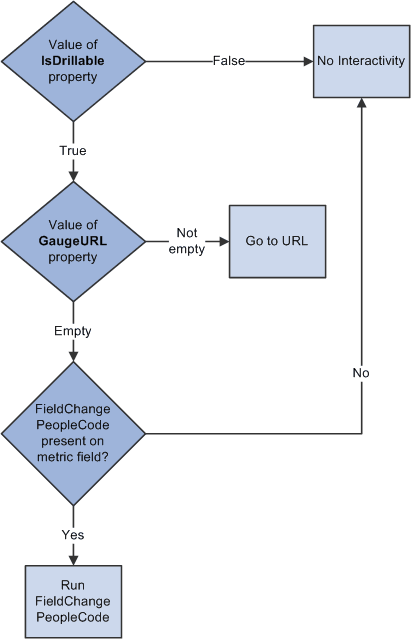
As illustrated in the following flowchart, in order to have your gauge be interactive, you must set the IsDrillable property to True. Then, if you have set the GaugeURL property to a valid URL, a click will redirect the user to that URL. If GaugeURL is not set, but there is FieldChange PeopleCode on the field that defines the gauge’s metric (that is, the field you passed into the GetStatusMeterGauge or GetLEDGauge function), then that PeopleCode will run. Otherwise, if neither GaugeURL is set nor FieldChange PeopleCode is present, then there is no interactivity even if IsDrillable is True.