Implementing Menus and Drop-Down Lists (Optional)
You can configure an organization chart to include menus and drop-down lists for any of the node descriptors.
Understanding Menus and Drop-Down Lists
This section discusses the following types of drop-downs:
-
Related action menu.
-
Drop-down menu.
-
Drop-down list box.
Related Action Menu
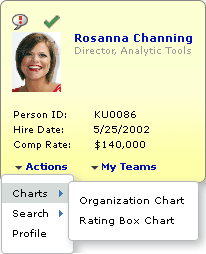
A related action menu is dynamically generated based on a related service configuration that has been defined in the PeopleSoft Related Content Framework. Related action links in the menu take the user directly to the target, using related values supplied by the node. Because the menu structure and links are defined by the related service configuration, the developer does not need to populate the drop-down rowset or to write PeopleCode for related action drop-down menus. You do need to verify that the related action services mapping page fields are included in the node record.
The following example shows a node configured with a related action menu.
Drop-Down Menu
A drop-down menu presents list items in a folder menu structure.
Drop-down menus can contain folders and menu items. Folders can be nested.
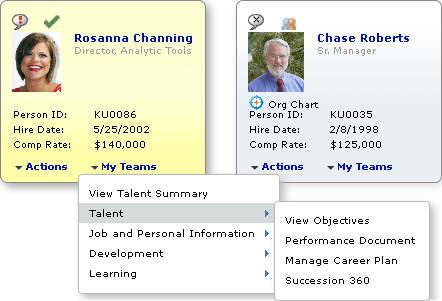
A drop-down menu can be linkable or read-only. If the drop-down menu is linkable, FieldChange PeopleCode associated with the descriptor field PTNDDESCnLINKABLE executes when a user clicks on a menu item. If the drop-down menu is read-only, FieldChange PeopleCode does not execute.
The following example shows a node configured with a drop-down menu.
Drop-Down List Box
A drop-down list box presents a list of linkable items.
The following example shows a node with a drop-down list box.
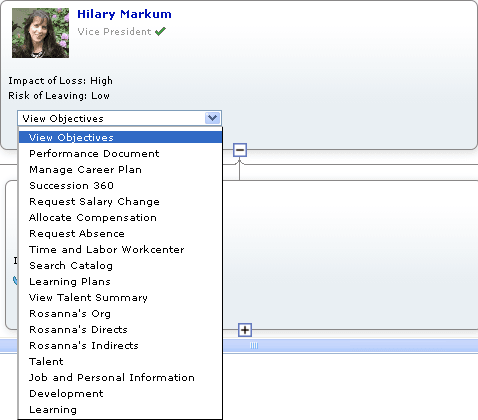
The width of a drop-down list box is the width of the widest list item that the box contains.