Defining Descriptors
An organization chart node contains a set of descriptors. Each descriptor represents one element of data related to the node.
The descriptors for a node are defined in the organization chart node data record, which includes a clone of the PTORGNODE_SBR subrecord. The organization chart node record can define up to 99 descriptors. One row in the organization chart node record defines one node in the organization chart.
See “PTORGNODE_SBR” in Organization Chart Subrecord Definitions.
These fields on the PTORGNODE_SBR define the descriptors for a node (where n is a number from 1 to 99; for example, PTNODE_DESCR1):
-
PTNODE_DESCRn
-
PTNDDESCnLINKABLE
-
PTDESCRn_ICON_IMG
-
PTDESCRn_ICON_POS
PTORGNODE_SBR is delivered with fields for seven descriptors. If you are using a node display template and need additional descriptors, you will need to add sets of descriptor fields, to a maximum of 99 descriptors.
Use the PTNODE_DISPLAY_ID field to optionally designate a node display template, which defines other display characteristics for nodes.
See “Using Node Display Templates” in Designing Organization Chart Nodes.
Descriptor Fields
The PTNODE_DESCRn field specifies the text for a descriptor, where n is a number from 1 to 99 (for example, PTNODE_DESCR1).
The PTNDDESCnLINKABLE field specifies the descriptor type. A descriptor can be one of the following types:
-
Y - Linkable text
-
N - Static text
-
A - Related action menu
-
D - Linkable drop-down menu
-
R - Read-only (non-linkable) drop-down menu
-
L - Linkable drop-down list box
-
I - Linkable Icon
-
O - Icon only
-
M - IM icon
When a user clicks a linkable descriptor, a linkable drop-down menu item, or a drop-down list box item, FieldChange PeopleCode associated with the PTNDDESCnLINKABLE field executes.
See Organization Chart Actions and Events.
When a user selects a related action menu item, the corresponding action executes. PeopleSoft Related Content Framework must be configured for related action menus.
If the descriptor includes an icon, specify the image name and position using the PTDESCRn_ICON_IMG and PTDESCRn_ICON_POS fields.
Suppose your application includes a node row with this data (some fields in the PTORGNODE_SBR subrecord are omitted for simplicity):
| Field | Value |
|---|---|
|
PTCHART_NODE |
ADIAZ |
|
PTPARENT_CHART_ND |
TMONT |
|
PTORGCHRTIMG |
(BLOB) |
|
PTNODE_DESCR1 |
Arron Diaz |
|
PTNDDESC1LINKABLE |
Y |
|
PTDESCR1_ICON_IMG |
|
|
PTDESCR1_ICON_POS |
|
|
PTNODE_DESCR2 |
Director, Upgrade |
|
PTNDDESC2LINKABLE |
|
|
PTDESCR2_ICON_IMG |
STATUS_COMP_ICN |
|
PTDESCR2_ICON_POS |
L |
|
PTNODE_DESCR3 |
Experience: Low |
|
PTNDDESC3LINKABLE |
Y |
|
PTDESCR3_ICON_IMG |
EXP_ICN |
|
PTDESCR3_ICON_POS |
R |
The following example shows the node that is created using the previous attributes:
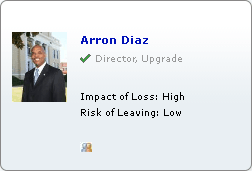
Drop-down lists require additional configuration.
Using Images with Organization Charts
If your organization chart uses images, such as photographs, then the scroll area or grid with the fields that contain the images must have unlimited occurs count enabled. That is, the Unlimited Occurs Count check box must be selected on any scroll area or grid that includes a record with the fields from PTORGNODE_SBR or PTORGPOPUPNODE_SBR, but only when images are used.