Inserting or Deleting a Row of Data Example
The CopyRowset and CopyRowsetDelta methods use the primary database name of a scroll, not the name you may give a collection.
A data collection represents a row of data. You often insert or delete a row of data.
To insert or delete a row of data:
In this example, you are getting a existing instance of data for the BUS_EXP Component Interface, which is based on the BUSINESS_EXPENSES component, then inserting (or deleting) a row of data in the second level scroll.
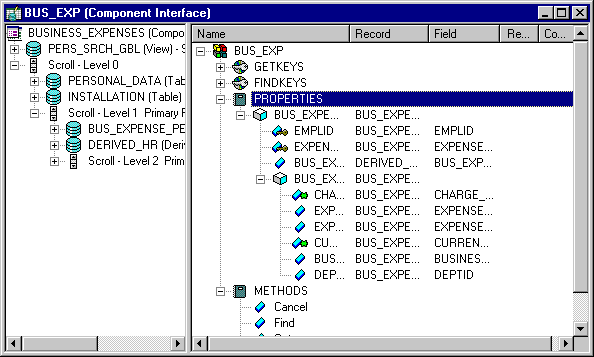
This example illustrates the fields and controls on the BUS_EXP Component Interface definition. You can find definitions for the fields and controls later on this page.
The following is the complete code sample: the steps explain each line.
Local ApiObject &MYSESSION;
Local ApiObject &MYCI;
&MYSESSION = %Session;
&MYCI = &MYSESSION.GetCompIntfc(COMPINTFC.BUS_EXP);
&MYCI.EMPLID= "8001";
&MYCI.Get();
&MYLEVEL1 = &MYCI.BUS_EXPENSE_PER;
/* get appropriate item in lvl1 collection */
For &I = 1 to &MYLEVEL1.Count
&ITEM = &MYLEVEL1.Item(&I);
&MYLEVEL2 = &ITEM.BUS_EXPENSE_DTL;
&COUNT = &MYLEVEL2.Count
/* get appropriate item in lvl2 collection */
For &J = 1 to &COUNT
&LVL2ITEM = &MYLEVEL2.Item(&J);
&CIDATE = &LVL2ITEM.CHARGE_DT;
If &CIDATE <> %Date Then
   /* insert row */
&NEWITEM = &MYLEVEL2.InsertItem(&COUNT);
/* set values for &NEWITEM */
Else
   /* delete last row */
&MYLEVEL2.DeleteItem(&COUNT);
End-If;
End-For;
End-For;
If NOT(&MYCI.Save()) Then
/* save didn’t complete */
&COLL = &MYSESSION.PSMessages;
For &I = 1 to &COLL.Count
&ERROR = &COLL.Item(&I);
&TEXT = &ERROR.Text;
/* do error processing */
End-For;
&COLL.DeleteAll();
End-if;-
Get a session object.
Before you can get a Component Interface, you have to get a session object. The session controls access to the Component Interface, provides error tracing, enables you to set the runtime environment, and so on.
&MYSESSION = %Session; -
Get a Component Interface.
Use the GetCompIntfc method with a session object to get the Component Interface. You must specify a Component Interface definition that has already been created. You receive a runtime error if you specify a Component Interface that doesn’t exist.
&MYCI = &MYSESSION.GetCompIntfc(COMPINTFC.BUS_EXP);After you execute the GetCompIntfc method, you have only the structure of the Component Interface. You haven’t populated the Component Interface with data yet.
-
Set the GETKEYS.
These are the key values required to return a unique instance of existing data. If the keys you specify allow for more than one instance of the data to be returned, or if no instance of the data matching the key values is found, you receive a runtime error.
&MYCI.EMPLID = "8001"; -
Get the instance of data for the Component Interface.
After you set the key values, you must use the Get method.
&MYCI.Get();This populates the Component Interface with data, based on the key values you set.
-
Get the level one scroll.
The name of the scroll can be treated like a property. It returns a data collection that contains all the level one data.
&MYLEVEL1 = &MYCI.BUS_EXPENSE_PER -
Get the appropriate item in the level one data collection.
Remember, scroll data is hierarchical. You must get the appropriate level one row before you can access the level two data.
For &I = 1 to &MYLEVEL1.Count &ITEM = &MYLEVEL1.Item(&I); -
Get the level two scroll.
This is done the same way as you accessed the level one scroll, by using the scroll name as a property.
&MYLEVEL2 = &ITEM.BUS_EXPENSE_DTL; -
Get the appropriate item in the level two data collection.
A data collection is made up of a series of items (rows of data.) You have to access the appropriate item (row) in this level also.
&COUNT = &MYLEVEL2.Count /* get appropriate item in lvl2 collection */ For &J = 1 to &COUNT &LVL2ITEM = &MYLEVEL2.Item(&J); -
Insert or delete a row of data.
You can insert or delete a row of data from a data collection. The following example finds the last item (row of data) in the second level scroll. If it matches the value of %Date, the last item is deleted. If it doesn’t match, a new row is inserted.
&CIDATE = &LVL2ITEM.CHARGE_DT; If &CIDATE <> %Date Then /* insert row */ &NEWITEM = &MYLEVEL2.InsertItem(&COUNT); /* set values for &NEWITEM */ Else /* delete last row */ &MYLEVEL2.DeleteItem(&COUNT); End-If; -
Save the data.
When you execute the Save method, the new instance of the data is saved to the database.
If NOT(&MYCI.Save()) ThenThe Save method returns a Boolean value: True if the save was successful, False otherwise. Use this value to do error checking.
The standard PeopleSoft save business rules (that is, any PeopleCode programs associated with SaveEdit, SavePreChange, WorkFlow, and so on) are executed. If you did not specify the Component Interface to run in interactive mode, FieldEdit, FieldChange, and so on, also run at this time.
Note:
If you’re running a Component Interface from an Application Engine program, the data won’t actually be committed to the database until the Application Engine program performs a COMMIT.
-
Check Errors.
You can check if there were any errors using the PSMessages property on the session object.
If NOT(&MYCI.Save()) Then
   /* save didn’t complete */
   &COLL = &SESSION.PSMessages;
   For &I = 1 to &COLL.Count
      &ERROR = &COLL.Item(&I);
      &TEXT = &ERROR.Text;
      /* do error processing */
   End-For;
   &COLL.DeleteAll();
End-if;
If there are multiple errors, all errors are logged to the PSMessages collection, not just the first occurrence of an error. As you correct each error, delete it from the PSMessages collection.
The Text property of the PSMessage returns the text of the error message. At the end of this text is a contextual string that contains the name of the field that generated the error. The contextual string has the following syntax:
{BusinessComponentName.[CollectionName(Row).[CollectionName(Row).[CollectionName⇒
(Row)]]].PropertyName}
For example, if you specified the incorrect format for a date field of the Component Interface named ABS_HIST, the Text property contains the following string:
Invalid Date {ABS_HIST.BEGIN_DT} (90), (1)The contextual string (by itself) is available using the Source property of the PSMessage.
Note:
If you’ve called the Component Interface from an Application Engine program, all errors are also logged in the Application Engine error log tables.