PrintJobRqstRpt method: ProcessRequest class
Syntax
PrintJobRqstRpt(ProcessInstance, ItemInstance [, PrintJobTree] [, PrintDistList] [, PrintNotifyList] [, PrintSystemMessage] [, PrintApplicationMessage] [, PrintParamList])Description
Use the PrintJobRqstRpt method to generate an HTML report file displaying the current status of a specific process, job, or jobset.
Parameters
| Parameter | Description |
|---|---|
|
ProcessInstance |
Specify the ProcessInstance number assigned to the process, job, or jobset |
|
ItemInstance |
Specify either to display all items in a job or jobset, or just a specific item.
|
|
PrintJobTree |
Specify whether to have the job tree displayed in the HTML report. This parameter takes a string value:
|
|
PrintDistList |
Specify whether you want the list of Users and Roles who will be the recipient of a report generated for a job item displayed in the HTML report. This parameter takes a string value:
|
|
PrintSystemMessage |
Specify whether you want to have the message specified from the Process Definition or Job Definition page displayed in the HTML report. This parameter takes a string value:
|
|
PrintApplicationMessage |
Specify whether you want the application messages displayed in the HTML report. These are the application messages that can be viewed from the Message Log subpage of the Process Monitor Detail page. This parameter takes a string value:
|
|
PrintParamList |
Specify whether you want the parameter list for a job item displayed in the HTML report. This parameter takes a string value:
|
Returns
An HTML report as a string.
Example
The following PeopleCode program:
Local ProcessRequest &JobRQST;
Local string &sHTML;
Local string &sPRINT_JOBTREE;
Local string &sPRINT_DISTLIST;
Local string &sPRINT_SYSMESSAGE;
Local string &sPRINT_APPLMESSAGE;
Local string &sPRINT_PARAMLIST;

&sPRINT_JOBTREE = "0";
&sPRINT_DISTLIST = "1";
&sPRINT_SYSMESSAGE = "1";
&sPRINT_APPLMESSAGE = "1";
&sPRINT_PARAMLIST = "1";
&JobRQST = CreateProcessRequest();
&sHTML = &JobRQST.PrintJobRqstRpt(PMN_PRCSLIST.PRCSINSTANCE, 0, &sPRINT_JOBTREE,⇒
 &sPRINT_DISTLIST, &sPRINT_SYSMESSAGE, &sPRINT_APPLMESSAGE, &sPRINT_PARAMLIST);
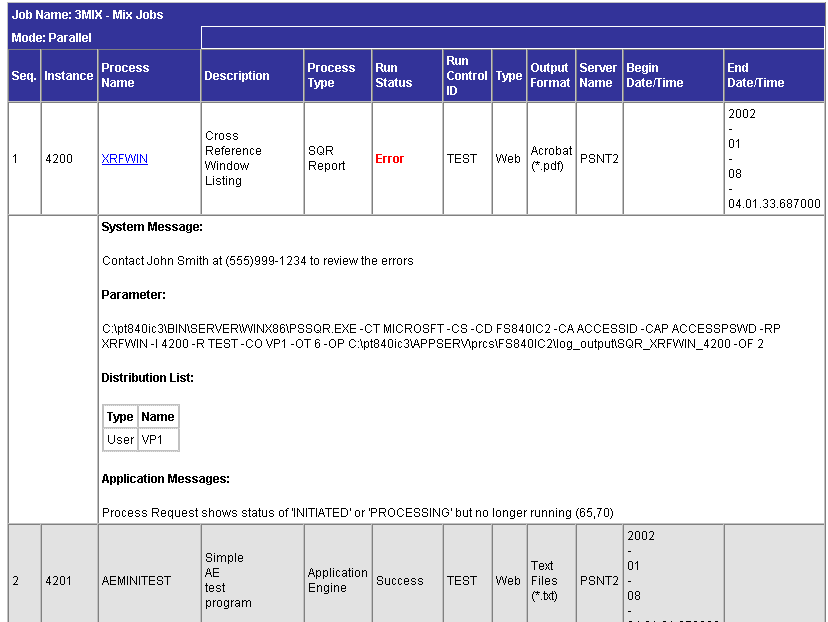
The following screen image is an example of a HTML report created after executing the above mentioned PeopleCode program: