PrintSchdlHTMLRpt method: ProcessRequest class
Syntax
PrintSchdlHTMLRpt([PrintJobTree] [, PrintDistList] [, PrintNotifyList] [, PrintMessageList] [, PrintParamList])Description
Use the PrintSchdlHTMLRpt method to generate an HTML report file displaying all items in a job or jobset as defined in the Scheduled Jobset Definition component.
Parameters
| Parameter | Description |
|---|---|
|
PrintJobTree |
Specify whether to have the job tree displayed in the HTML report. This parameter takes a string value:
|
|
PrintDistList |
Specify whether you want the list of Users and Roles who will be the recipient of a report generated for a job item displayed in the HTML report. This parameter takes a string value:
|
|
PrintNotifyList |
Specify whether you want the list of Users and Roles who will be notified for the status of a job item displayed in the HTML report. This parameter takes a string value:
|
|
PrintMessageList |
Specify whether you want the messages that will be sent as email upon completion of a job item displayed in the HTML report. This parameter takes a string value:
|
|
PrintParamList |
Specify whether you want the parameter list for a job item displayed in the HTML report. This parameter takes a string value:
|
Returns
An HTML report as a string
Example
The following code:
Local string &sHTML;
Local string &sPRINT_JOBTREE;
Local string &sPRINT_DISTLIST;
Local string &sPRINT_NOTIFYLIST;
Local string &sPRINT_MESSAGELIST;
Local string &sPRINT_PARAMLIST;

&sPRINT_JOBTREE = "1";
&sPRINT_DISTLIST = "0";
&sPRINT_NOTIFYLIST = "0";
&sPRINT_MESSAGELIST = "0";
&sPRINT_PARAMLIST = "0";
&JobRQST = SetupScheduleDefnItem("Sample", "MULTIJOB");
&sHTML = &JobRQST.PrintSchdlHTMLRpt(&sPRINT_JOBTREE, &sPRINT_DISTLIST, &sPRINT_⇒
NOTIFYLIST, &sPRINT_MESSAGELIST, &sPRINT_PARAMLIST);
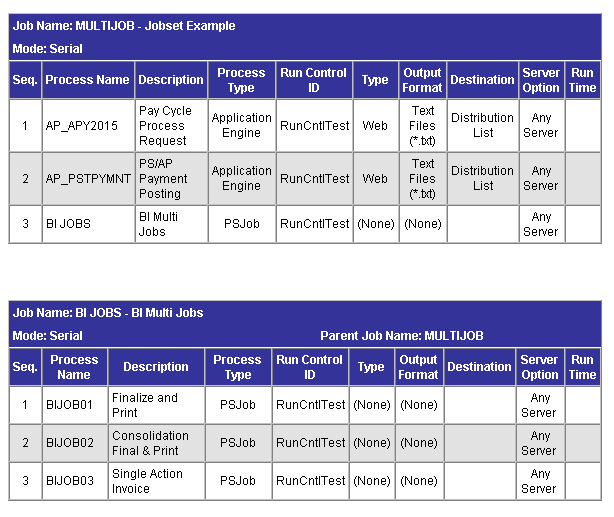
Creates the following HTML report:
The following screen image is an example of a HTML report created after executing the above mentioned PeopleCode program: