SetExplodedSectorsArray method: Chart class
Syntax
SetExplodedSectorsArray (&Array)
Description
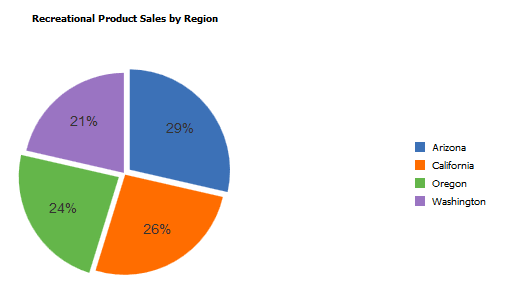
Use the SetExplodedSectorsArray method to specify the sectors in a pie chart that you want exploded. Specify a one-dimensional array of type integer to specify which sectors to explode. This is an optional method. The default is no sectors are exploded.
Sector numbers correspond to the rows of data used to generate the chart.
The PIECHARTSEGMENTEXPLOSIONDISTANCE style class in the PSCHARTSTYLE_FREEFORM and in the PSCHARTSTYLE_TANGERINE_FREEFM style sheets controls the explode offset for all pie chart sectors. The explode offset is expressed as a proportion of the pie radius. This style class is delivered with a default value. If you want exploded segments displayed farther from the pie chart center, adjust the value up; if you want segments displayed closer to the center of the pie chart, adjust the value down. We recommend using a value for PIECHARTSEGMENTEXPLOSIONDISTANCE between 0 and 100. The default in PSCHARTSTYLE_FREEFORM is 40 and in PSCHARTSTYLE_TANGERINE_FREEFM it is 100.
Parameters
| Parameter | Description |
|---|---|
|
&Array |
Specify an already instantiated one-dimensional array of number. This array lists the sector numbers that will be exploded. Sector numbers must be integer values. The default is no sectors are exploded. |
Returns
None.
Example
Local array of number &ExplodedArray;
&ExplodedArray = CreateArray(1,2,3,4,5)
&cChart.SetExplodedSectorsArray(&ExplodedArray);
The following example shows an exploded 2D pie chart: