SetDataZAxis method: Chart class
Syntax
SetDataZAxis(Record_Name.Field_Name)Description
Use the SetDataZAxis method to specify a field that contains numerical data defining the size of each data point in a bubble chart or the width of the bar in a bar chart (or the height of the bar in a horizontal bar chart).
Parameters
| Parameter | Description |
|---|---|
|
Record_Name.Field_Name |
Specify the name of the record and the field on that record that contains numerical data defining the size of each data point. |
Returns
None.
Example
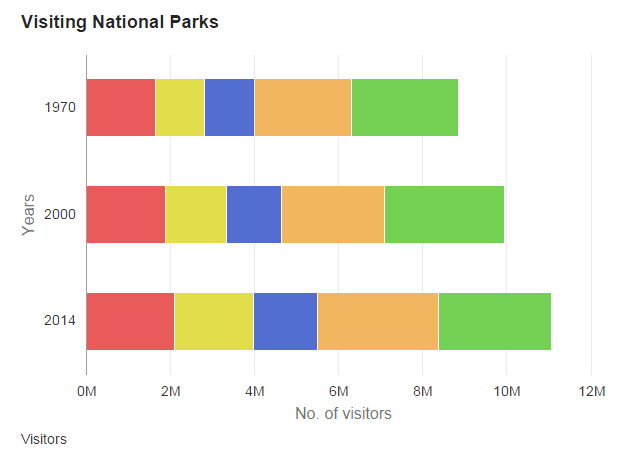
&oChart.SetDataZAxis(QE_CHART_NPARKS.QE_CHART_Z);Because no z-axis data is specified for the following stacked horizontal bar chart, the height of each bar is the same.
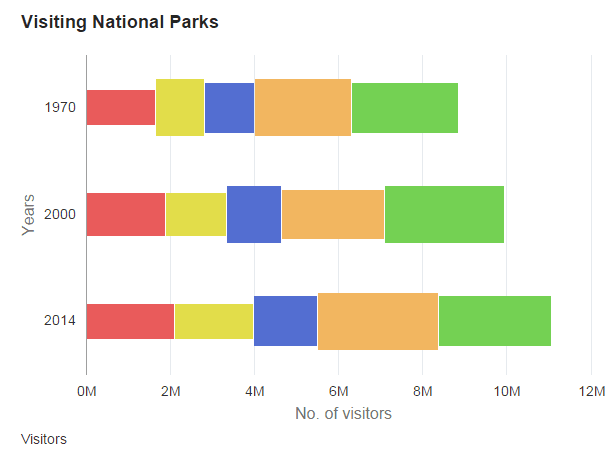
Because z-axis data is specified for the following stacked horizontal bar chart, the height of each bar varies according to the data value.
Related Topics