Using the Rating Gauge Classes
Rating gauges are typically used to display or accept user feedback on a product or service. A rating gauge can be interactive or display only.
Display-only rating gauges (the ReadOnly property is True) set the gauge to the value of the field that was used when the rating gauge was created with the GetRatingGauge built-in function. The value of the rating gauge cannot be changed by the user.
Interactive rating gauges (the ReadOnly property is False) can update the underlying value in the RECORD.FIELD that was used when the rating gauge was created with the GetRatingGauge built-in function. If there is FieldChange PeopleCode on the field, the PeopleCode executes only for an interactive rating gauge.
The display of a rating gauge can be changed in two ways:
-
Based on the state of the rating gauge.
-
Based on threshold values against which the value of the rating gauge is compared.
A rating gauge can support four different states depending on the chart type:
-
Unselected
-
Selected
-
Hover (interactive only)
-
Changed (interactive only)
Here’s an example of a gauge transitioning through three states. Each state displays the gauge data differently:
| Field or Control | Description |
|---|---|
|
|
A rating gauge in the unselected state. |
|
|
A rating gauge in the hover state. |
|
|
A rating gauge in the selected state. |


You can set the display characteristics for each state using the RatingGaugeState class. You create an instance of this class, set its properties, and assign the instance to the corresponding state property on the RatingGaugeChart instance that you created.’
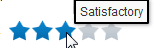
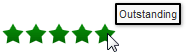
In addition, a rating gauge supports up to three thresholds. Different thresholds can cause the rating gauge to change color and present different tooltip text based on the gauge value:
| Field or Control | Description |
|---|---|
|
|
A rating gauge with thresholds (Outstanding rating) |
|
|
A rating gauge with thresholds (Satisfactory rating) |

You can set the characteristics for each threshold value using the GaugeThreshold class. You create an instance of this class and set its properties, including the threshold maximum. Create an array of GaugeThreshold instances and assign the array to the RatingGaugeChart object using its SetRatingGaugeThresholds method. If a gauge color or border color is set in a gauge threshold, those colors override the colors set by the rating gauge states.